TSS Find a Student is Restored
***NOTE: A few of the details & dates in this article have been updated as of October 9, 2026.
We are pleased to share that the Find a Student application in TSS is officially back online. We know its unavailability has created challenges for staff who rely on it to support students, and we appreciate your patience while the team worked to restore it. To access Find a Student, log in to TSS at sis.ucsd.edu and search for the “Find a Student” application.
🚩Before you begin using Find a Student, review the following items regarding known data gaps:
- Summer 2026 courses and grades data
- For undergraduate students - added to TSS in late September
- For graduate students - to be added to TSS by mid-October
- For Extended Studies students - to be added to TSS by mid-October
- Late/missing Spring 2026 grades reported after June 29, including Study Abroad grades and academic integrity cases, do not yet appear in Degree Audit or TSS. These grades will be manually entered into TSS in the coming weeks, including grade changes processed in ISIS after the data migration. If there is an urgent need for a grade change to be finalized due to its impact on Fall booking, please submit a ticket to TSS with the request.
- Double major updates from petitions processed since June 29 do not yet appear in the Degree Audit or TSS. The Registrar’s Academic Records team is updating these manually in the coming weeks.
- Transfer coursework is newly added with the uAchieve Degree Audit integration, including the source institution and the equivalent/articulated UC San Diego course. Review it carefully, comparing against TritonLink for validation. Report discrepancies to uAchieveTA@ucsd.edu with as much information as possible (e.g., comparison screenshots of TSS and TritonLink/ISIS).
- GPA, Academic Standing, and other Progress to Progression information, including the Cumulative Summary tab, will show Pending until this information is updated in TSS in October.
- Students do not yet have access to their academic data in TSS, but they are still able to view key information about their record through uAchieve Degree Audit in TSS. The My Academic History application for students is expected to be available in early November.
Tips for using Find a Student
-
- Review guidance and training via TSS Training: Student Records. Guides for both staff and faculty are available.
- 🚩IMPORTANT: Updates to the training guides are complete as of September 20.
- Search by TSN, name, email, or PID. If searching by full name, use quotations for optimal search results (i.e. “Kim Possible”).
- For searches of common names that may yield several responses, only 100 results will display.
- If you are having trouble locating the student record, please attempt to search with multiple different data points.
- The Term Audit feature (bottom right corner of Find a Student) shows Fall 2026 term course information, including waitlisted courses. Note: it does not show course information from previous quarters/terms.
- Fall 2026 waitlisted courses are not visible under “Current Bookings” as the Waitlisting tab is greyed out until a future release. View waitlist information via the Term Audit.
- Review guidance and training via TSS Training: Student Records. Guides for both staff and faculty are available.

- External Work shows coursework that was transferred to UC San Diego. Use the Detail view (not Summary) for more information. This includes migrated transfer work from ISIS (represented with a prefix of Z## in the “External” column) and transfer work that was processed via uAchieve Transfer Articulations (represented in the format SUBJ\CRSE#).
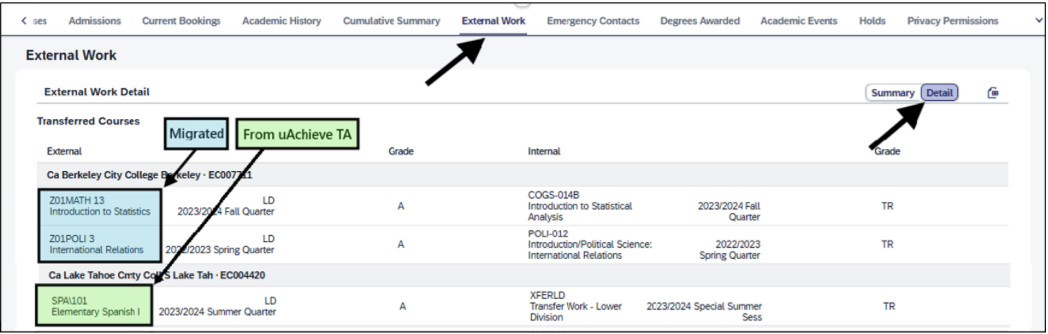
- uAchieve Degree Audit is the primary data source for how transfer coursework is being applied to a student’s degree requirements, including transferable units on an individual course basis. TSS and uAchieve will apply transfer unit limits in the total units in accordance with Limits on Transfer Units.
- Privacy Permissions section explanation: The green “Allowed” option indicates permission/approval to release the information pertaining to that row if there is a valid reason to do so. In the example below, permission has been granted to release information to Scholarship Agencies (though it is strongly recommended that students go through central/main offices for information release).

A Note on Performance
As Find a Student usage increases across campus, you may experience slower load times or occasional technical hiccups. If you encounter a technical issue or delay, please wait a few minutes and retry before submitting a ticket to tss@ucsd.edu or via another TSS support channel.
Suggestions or feedback regarding the Find a Student experience can be submitted on the Share Your TSS Experience form.
We thank you for your continued support and patience as we transition to TSS.
Sincerely,
The TSS Implementation Team