Triton Student System (TSS) Project
The TSS Project implemented a new student information system, the Triton Student System (TSS), to replace our old system (ISIS) and bring together main campus and Division of Extended Studies on to the same system.
Alert
System Maintenance
Beginning Tuesday, July 28 and until further notice, TSS may be unavailable nightly (including weekends) from 11:00 p.m. to 7:00 a.m. Pacific time to support ongoing data migration and ensure peak performance. Visit the UC San Diego ITS Systems Status page to check for current incidents and service updates related to TSS.Important Requirements
TSS works best with Google Chrome web browser on laptop or desktop computer. Using Chrome on a mobile device or tablet may prevent students from being able to complete their booking (a greyed out ‘book’ button). Students using other browsers, such as Firefox and Safari, have also reported issues with booking courses.
TSS Quick Start Info
View the links and resources below for learning about and accessing TSS (AD login required). Technical or access issues should be reported to tss@ucsd.edu. Note that Extended Studies students should view detailed instructions (linked on the side) for choosing the correct student portal.
What's Happening Now
Need a closer look? View the full presentation: TSS Update Slides. Descriptive text has been added in the speaker notes of each slide for screen readers.
Resources
Find TSS Support
- Support Portal: SNOW Ticket Submission
- Email: tss@ucsd.edu (Mon-Sun)
- Call: 858-246-4357 (Mon-Sun), press 2 for Main Campus TSS Support, press 3 for Extended Studies TSS Support
- Join: Zoom Office Hours (Mon-Fri only)
For dates, hours and more details, go to: Getting Support For TSS
Support & Updates
Getting Support for TSS
- Support portal: SNOW Ticket Submission
-
- Same hours as email support (see below)
-
- Phone support: (858) 246-4357
- Press 2 for Main Campus undergrad & grad TSS Support
- Press 3 for DES (Division of Extended Studies) TSS Support
- Same hours as email support (see below)
- Email support: tss@ucsd.edu which will route requests into the support process
- Weekdays (Monday through Friday)
- September 21 to December 18: 7:00 a.m.–10:00 p.m.
- Weekends (Saturday and Sunday)
- September 19 to December 13: 12:00p.m.–3:00 p.m.
- Weekdays (Monday through Friday)
- Office Hours support: Zoom
- Weekdays (Monday through Friday) only
- September 21 to December 18: 9:00 a.m.–7:00 p.m.
- No weekend support
- Weekdays (Monday through Friday) only
Tips for accessing support:
- Be Specific:
- Tell us who you are. Include your role and context to assist you swiftly. Examples: "I am a scheduler in Biological Sciences," "I am an undergraduate advisor in Eighth College," or "I am a faculty member."
- Share as much detail as possible. Tell us what you were doing, what you expected to happen and what actually happened. Include screenshots or screen recordings when possible.
- Report Only Once: Submit one ticket per issue, avoid follow-up check-ins unless you have new information and close your ticket once resolved. These simple actions help us maintain an accurate view of active issues and focus our attention where it's needed most.
- Use Official Channels for Updates: Use established communication channels for updates rather than contacting individual team members directly. When new information is available, we'll share it broadly.
TSS Current Limitations & Known Issues Doc
For the latest information on TSS limitations and known issues, please see the TSS: Current Limitations & Known Issues Doc.
FAQ: Training
TSS TRAINING PAGES
TRAINING VS. SUPPORT
1. How are training and support different?
Both training and support have the common purpose of helping people acquire skills. However, training is more focused on teaching new skills, abilities or knowledge to ensure participants can perform tasks or use tools/systems effectively. Support, on the other hand, is focused on helping resolve issues or answering questions as they arise during or after implementation. Training tends to be more proactive, whereas support is more responsive.
2. What are the goals of each?
The primary goal of training is knowledge transfer, or making sure participants learn new skills, processes or tools. It is helpful in developing competence in executing tasks, preparing participants to navigate their responsibilities independently and helping learners adapt to new processes or systems. The primary goal of support is to resolve a problem by addressing specific issues a user may encounter. It is helpful in minimizing disruptions, clarifying gaps in knowledge and supporting continuous improvement by providing timely help.
TRAINING PLAN
3. How long will the training be?
Training is aimed to take place closer to each system’s go-live date. We currently anticipate that the training will consist of microlearning modules, or "bite-sized," 30- to 45-minute lessons on a specific area. These may be held asynchronously, virtually or in-person. The schedule and length of training sessions will be designed to accommodate different learning styles and availabilities. As the training plan continues to be developed, we will share confirmed details with the university community.
4. How will training be rolled out?
We will prepare learners in phases: prior to, during and after the scheduled go-live dates. Our current plan, which may change based on specific user and project needs, includes initial sessions will focus on foundational knowledge to provide users with the skills they need for immediate success post-launch. During the go-live period, additional resources will be available to address real-time challenges. These may include live Q&A sessions, help desks or on-call trainers. Follow-up training will focus on advanced features, updates or topics identified as common pain points.
5. How will users provide feedback on the effectiveness of training materials?
Our goal is to provide training that meets the needs of all users, therefore, multiple avenues for providing feedback will be available. We invite the university community to share their team’s training needs through this survey to shape the content and approach. Participants will have access to post-training surveys, allowing them to share insights about the content, format and overall effectiveness. Users will also have the opportunity to offer real-time feedback in synchronous sessions and communication channels. Additionally, surveys, assessments, focus groups and periodic check-ins may follow sessions to gauge understanding and identify areas requiring further training or improvement.
6. What will be the scope of the SIS Project training?
Our training efforts will focus primarily on the system and its associated tasks and processes. Except in rare cases approved by project governance, we will not develop training for applications, integrations or reports connected to each system. The development and delivery of training for these upstream and downstream systems fall outside the scope of our work for the SIS Project.
TRAINING FORMATS
7. What are the different types of training formats?
We plan to offer training in a variety of formats to accommodate different learning styles and schedules. We currently anticipate this will include:
- Asynchronous modules, such as eLearning and pre-recorded lessons;
- Synchronous sessions, such as live webinars, demos and instructor-led sessions delivered virtually;
- In-person workshops; and
- On-demand resources, such as reference guides, job aids and survival sheets.
8. How will training accommodate different learning styles?
Our team plans to design the training with flexibility in mind to cater to different learning styles, including visual components, such as video demonstrations and step-by-step guides; written components, such as structured text and downloadable guides; interactive components, such as online activities and practice scenarios; and auditory components, such as live discussions, recorded presentations and text-based narration.
9. Will training be customized to specific users?
We expect that training will combine general knowledge for the broader campus audience with curated sessions for specific user groups to address unique workflows or processes. These lessons will be tailored to different roles and responsibilities to ensure relevance and applicability.
10. How will on-demand resources help users?
We expect that on-demand resources, such as recorded lessons, user guides and FAQs, will be housed in a centralized, easily accessible location. These resources will be organized and searchable by topic, making it easy to find answers to specific questions. Materials will be updated regularly to reflect system changes or enhancements.
11. I'm an employee. Which TSS Role should I request access to?
Please view the guide on roles and access: TSS Roles & Access
SUPPORT PLAN
12. How will users be supported during the training process?
Training will work hand-in-hand with support services to ensure users feel confident in using the system. At the onset, participants will receive clear instructions and access to preparatory materials. During the training, trainers will be available to answer questions and provide guidance during live sessions. After training, we plan to offer follow-up resources aimed at preserving the information and skills learned.
13. What are some opportunities to maximize knowledge retention?
To reinforce the material learned, participants will have access to revisit modules as needed for additional practice or clarification at any time. Periodic check-ins will inform our team if additional refresher trainings should be provided to address common challenges.
14. What about new employees or those who haven’t used the legacy SIS systems?
As new employees join or roles evolve, training resources will remain available to onboard and upskill new/returning users effectively. New/returning users will be able to access training resources at their convenience.
15. What is hypercare and how does it support users?
Hypercare is an enhanced support period immediately following the go-live. It is designed to ensure a smooth transition and address any immediate concerns. Hypercare support often includes a dedicated support team, such as trainers, IT staff and system experts, to provide real-time assistance.
16. Will there be specialized support for high-impact user groups or roles?
Specialized support is a key consideration for our team and the specific details are still underway. Our goal is to tailor resources and sessions to meet the unique needs of different user groups, which may include follow-up training, advanced tutorials or additional materials. We are also exploring options for dedicated support, which could include live Q&A sessions, office hours or dedicated communication channels. The specialized support strategy will be shared as it evolves and becomes finalized.
STUDENT TRAINING
17. What is the format for student-facing TSS trainings (e.g., Canvas course, YouTube tutorials, screenshots)?
Student training materials are housed on this TritonLink Tools Help page, which will be updated to reflect TSS. The format matches other resources linked on this page, such as quick written guides to leverage the CTRL + F feature, short videos for more complex tasks, and other modalities to fill different needs, such a glossary of TSS terms and a navigation eLearning course.
18. Are there different training materials for continuing students since they have been used to the former WebReg process vs the incoming students who will only know TSS? Or is it all the same content since TSS is new for everyone?
The training materials are centered around task execution guidance in TSS, for example, "How to use the Schedule of Classes." As such, the step-by-step process is more or less the same for both incoming and continuing students.
19. I'm a student worker employed by UC San Diego. Which TSS Role should I request access to?
Please view the guide on roles and access: TSS Roles & Access
News & Articles
To support the TSS launch, we released a weekly newsleter focused on TSS. See the released TSS-entials weekly newsletters:
- 10/16/2026: Late Adds/Changes Drops in TEA are live
- 10/9/2026: Updates about My Academic History and Major/Minor Tool replacement
- 10/2/2026: New ITS Service Desk option for Extended Studies
- 9/25/2026: Waitlisted students now included in My Class List
- 9/18/2026: Find a Student is restored
- 9/11/2026: Waitlists & DSA roles
- 9/04/2026: Undergraduate Degree Audits now available
- 8/28/2026: Financial Aid updates & BAH reports
- 8/21/2026: Second pass and waitlists open
- 8/14/2026: TSS is live for Division of Extended Studies (DES) students
- 8/07/2026: New Job Aids, updates to Student Planner, and TEA FAQs for advisors
- 7/31/2026: Latest TSS Status & Progress
- 7/24/2026: TSS is live for students
- 7/17/2026: TSS is live for staff and faculty
- 7/10/2026: Preparing for launch
Articles shared below are listed from newest (top) to oldest (bottom). Please note that some content of older articles may be slightly out of date. To ensure you review the most accurate content, we recommend to review the most recent (newest) project information or articles.
- TSS Late Adds/Changes/Drops available in TEA (October 2026)
- Campus Notice: Supporting Our Campus Community During Triton Student System Stabilization (September 2026)
- Campus Notice: TSS Updates for Faculty - Find a Student, Class Rosters and More (September 2026)
- TSS Find a Student is Restored (September 2026)
- Departmental Security Administrators - Changes to TSS Access (September 2026)
- Campus Class List & Additional BAH Reports Now Available (August 2026)
- Schedule of Classes Updates and Known Issues (August 2026)
- TEA Batch Authorization is Here (August 2026)
- TSS Project: Holds Process Changes & Job Aid Available (July 2026)
- Campus Notice: Triton Student System (TSS): Planned Maintenance Window (July 2026)
- Campus Notice: Triton Student System (TSS) Project: A New Class Planner Option (July 2026)
- Campus Notice: Triton Student System (TSS) Launch Updates and Support (July 2026)
- Transition from EASy to TSS (July 2026)
- TSS Schedule of Classes Functionality (July 2026)
- Fall 2026 Booking Calendar Update (July 2026)
- Campus Notice: Triton Student System (TSS) Access for Faculty and Staff (July 2026)
- Campus Notice: What to Expect: Triton Student System (TSS) Launches Mid-July (July 2026)
- TSS Project: ACTION REQUIRED: Update Direct Deposit Information & Financial Aid Disbursements Paused (June 2026)
- TSS Project: Student Holds Freeze (June 2026)
- TSS Project: Student Account Charges Freeze from July 1 - Early August (June 2026)
- TSS Project: Update on TEA Admin App functionality for initial launch (June 2026)
- TSS Project: Temporary Access Gap for the Major/Minor Tool (MMT) (May 2026)
- Campus Notice: Changes to the Student Portal: MyTritonLink Replaced by the Triton Student System (TSS) (May 2026)
- TSS Training Website: Your Go-To Resource for Upcoming Training (April 2026)
- TSS: Impact on Student Applications (April 2026)
- TSS Project: You Said, We Did (March 2026)
- TSS Scheduling Training: Coming Soon! (February 2026)
- Campus Notice: Sustaining Focus and Stability as We Prepare for the Triton Student System Launch (January 2026)
- Triton Student System (TSS): Demonstrations Recap (January 2026)
- Campus Notice: Triton Student System Project - Fall 2026 Student Enrollment Shift from May to July (Novermber 2025)
- Triton Student System (TSS): System Testing (October 2025)
- Prepare for Launch in Summer 2026: Triton Student System (TSS) (October 2025)
- Triton Student System (TSS): Impacts on Applications You Use (October 2025)
- TSS Process Group 4: Design Done, Build Begins (June 2025)
- Revised TSS Timeline: SU26 Release (May 2025)
- Campus Notice: Triton Student System Project Timeline Update (May 2025)
- TSS Process Group 3: The Joy of Progress (March 2025)
- TSS Process Group 2: The Journey Continues (February 2025)
- Navigating New Systems: The Role of Training (January 2025)
- That's a Wrap on Process Group 1 (October 2024)
- They Advise, We Revise: TSS Project Advisory Committee Kickoff (August 2024)
- Sharing the Wealth: Learning about SLcM from the University of Kentucky (August 2024)
- New SIS, New Name: Introducing the Triton Student System (June 2024)
- Initial Release of the New SIS Explained (June 2024)
- Let's Get Down to Business: Process Design Workshops (May 2024)
- SLcM Training: Setting the Stage (April 2024)
- Project to Replace ISIS Moves Forward (March 2024)
- Campus Notice: Project to Replace ISIS with SAP’s Student Lifecycle Management Receives “Go” from Leadership (March 2024)
- System to Replace ISIS Selected (December 2023)
- Campus Notice: Contract for New Student Information System Awarded to invenioLSI for SAP’s Student Lifecycle Management (December 2023)
- Backfill: Prioritizing Staff Expertise for the SIS Project (August 2023)
- Time to Upgrade: Why We Must Replace ISIS Now (June 2023)
- Preparing for Change Freezes (May 2023)
- Moving the SIS Project Forward After a Second No Award (September 2022)
- The Future State of SIS Reporting (March 2022)
- RFP for SIS Vendor Partnership Released (November 2021)
- Next Steps Toward a New SIS (February 2021)
- Information and Understanding Exchange (January 2021)
- SIS Moves Forward with Executive Support (July 2020)
If you'd like to learn more about the continuity planning & report remediation efforts, please see these articles:
- Retirement of Student QueryLink Reports & Updates (January 2026)
- Student QueryLink Reports Remediation Updates (November 2025)
- Second Round of Student Reports Now Available (August 2025)
- The First New Student Reports Are Here! (July 2025)
- Get Ready: New and Improved Student Reports Coming to the Business Analytics Hub (June 2025)
- A New Chapter for Report Remediation (March 2025)
- Planning for Continuity Planning (May 2024)
- Preparing Stakeholders for Reporting Changes (November 2023)
- SIS Project Preparation Work: Report Remediation (June 2022)
- Minimizing Disruptions and Supporting Report Access (December 2021)
- Reporting in Focus (July 2021)
- Focus on Reporting and “Pre-habilitation” Activities (May 2021)
About the Project
Major Milestones Doc
For the latest up-to-date major milestones of the TSS Project, please see the TSS: Major Milestones Doc.
TSS Project Leadership & Student Collaboration (NEW!)
Since August 19, TSS Project leadership has been partnering with Associated Students (AS) and the Graduate and Professional Student Association (GPSA) to learn about the TSS student experience, receive feedback, and hear concerns.
View the below resource, which is a living document providing an overview of the partnership, documenting topics raised, actions taken, decisions, and outcomes. If needed, viewers can access the document via TSS Project Leadership + Student Collaboration.
FAQ: Project Impact
OVERVIEW
1. Why is ISIS being replaced with TSS?
There are many reasons why the university is replacing its legacy student information system, known as ISIS.
The top three reasons are:
(1) ISIS is outdated and no longer meets the university’s growing needs
(2) ISIS is inefficient, and its manual processes have inhibited the development of new features
(3) maintaining the system’s manual processes is costly and only a handful of people know how to do this work
2. What is the overall impact of the TSS Project?
The TSS will modernize workflows, streamline processes, and enhance system integrations. The overall impact of the TSS is to reduce inefficiencies, improve user experience, and better support the university’s academic and administrative goals.
3. What changes will the TSS Project bring to the university?
The TSS Project is not just about technology replacement, but also about re-evaluating and improving existing processes to align with the new system. This is accomplished through detailed business process mapping, analysis and improvement, using the Lean Six Sigma methodology. This process-oriented approach seeks to optimize university operations for greater effectiveness.
4. How is the change or transition to TSS being managed?
We recognize that the TSS Project represents a significant change with the potential to disrupt existing processes and workflows. As such, the project includes a comprehensive organizational change management (OCM) strategy that involves tailored communication, managing concerns and expectations, collecting feedback, engaging with audiences, and offering coaching and support.
IMPACT ON PEOPLE
5. How will people be supported throughout the transition?
To support staff, students, and faculty with the transition, the project team has implemented a comprehensive communications and training strategy to address the unique needs and challenges of each group. Throughout the rollout, ongoing training is being released to support the adoption of the new system and procedures. Additionally, faculty are informed via updates to Senate Leadership and represented by a faculty member on the governance committee. View the below resources for more information.
- Students
- Staff
- Faculty
6. What is the impact on staff?
The launch of TSS in July 2026 has significantly shifted how staff carry out their roles. First, due to the phased rollout of TSS functionality, ISIS data is being migrated to TSS sequentially. This will affect departments that rely on student data. We understand the impact this limitation has on department workflows, and we intend to identify and communicate opportunities for workarounds when possible. Second, business process mapping will revise how tasks are performed in order to simplify workflows across departments. Staff will need to adapt to new interfaces and data structures, which may involve adjusting how student information is accessed and managed.
7. What is the impact on faculty?
TSS will transform how faculty members manage their courses with new processes, including: grade entries will be in TSS replacing eGrade, Class Lists on Blink will be replaced by a new TSS application, and Student Name Lookup in Blink will be Find a Student in TSS.
Additionally, major/minor codes and class codes have been updated for TSS. Terminology has changed from “enrollment” to “booking”, and the current enrollment authorization system (EASy) is being replaced with the TSS application, TEA (Triton Enrollment Authorization). Some TSS tools and functionality for faculty are still becoming available as part of the transition. The Class Roster app is expected to be available before Fall Quarter instruction begins.
8. What is the impact on students?
TSS is changing how students access and manage their academic and personal information at UCSD. In addition to students using TSS for many activities previously completed through MyTritonLink and other legacy applications, part of the broader goal of the TSS Project is to enhance the student experience and simplify processes. “Enrollment” is now called “booking” in TSS, and beginning with Fall Quarter 2026, students will use TSS to book classes instead of WebReg. Booking windows will follow a new cohort-based model determined by quarters completed and units based, replacing the previous system of individual enrollment times. View booking window start times here. Students will also receive a new Triton Student Number (TSN), which will replace the legacy PID. See more information on the full details of impacts to student applications.
We understand that transitioning to a new student system requires adjusting to new tools and processes. Changes to booking also mean students may need to adjust how they approach course planning. More information on how to plan your class schedule can be found on the Plan Your Class Schedule Blink page. Students who need additional advice and support can contact their academic advisor or department to make a plan to support their degree requirements, whether that be booking another section, waitlisting a section, or considering alternative courses to take. Academic advisors and departments are the best resource for students to understand their options and provide guidance on their academic plans based on their departmental enrollment practices.
8. How is the impact being addresses by the project team?
As the TSS launch continues to roll out, the project team is continuing to address limitations, resolve issues, clarify processes and workarounds when available, and provide guidance and support. While the transition to TSS has involved disruptions, the project team is committed to minimizing these impacts through timely communication and resources when possible.
FAQ: Continuity Planning & Reporting
CONTINUITY PLANNING
OVERVIEW
1. What is Continuity Planning?
As part of the ESR Program, Continuity Planning is taking place for the Student Information System (SIS) Project to ensure a smooth transition for local business operations as UC San Diego replaces the legacy systems with new ones. This includes maintaining critical functionality and minimizing disruption as legacy systems are retired. Key activities include identifying impacted systems, clarifying business objectives, and determining a remediation strategy that balances long-term sustainability with practical constraints such as resource availability and limitations.
2. Who is involved in the Continuity Planning process?
The Continuity Planning team collaborates with business process owners and technical teams to evaluate solutions for remediation of their owned applications, integrations and reports to ensure the solution meets the needs of each process.
3. How is remediation part of Continuity Planning?
Ensuring that business processes supported by current applications, reports, and integrations continue to function after the Triton Student System (TSS) go-live is critical to the success of the TSS Project. This may involve migrating functionality into TSS or updating existing tools to align with it.
4. In what ways are reports part of remediation efforts?
We know that student data-related reports and applications are critical to campus operations, and maintaining their continuity during the transition from ISIS to TSS is a top priority. Remediation plans are designed by the technical owners of the application/report and the business owner/unit, with input from the Continuity Planning team, with the goal of balancing long-term viability, resource availability, and operational constraints. Through collaborative execution, the Continuity Planning team helps ensure that transition plans are implemented effectively to ensure timely remediation.
MASTER INVENTORY (AKA DATA USE INVENTORY)
5. Why is there a master inventory list and what is it?
As new processes and technologies are implemented through the SIS Project, some current systems and data sources will be retired, changing how the university community accesses student data. The Continuity Planning team is partnering with campus stakeholders to help ensure their existing tools and processes continue to function by connecting to the new data sources, such as the Student Analytics Hub (SAH). The first step is identifying the business processes within departments and units that rely on student data. To support this, there have been multiple calls for inventory, resulting in a master inventory list that captures existing business processes and applications that rely on student data sources and the Data Warehouse.
Continuity Planning Master Inventory (VPN or campus connection required)
Master Inventory submission form
6. What is my role with the master inventory and self-remediation?
Each unit/department is responsible for managing the remediation of its own reports and applications. If you haven’t already, we encourage all units to review the master inventory and submit any new requests as soon as possible. Detailed instructions regarding submitting reports to the master inventory are available on the Continuity Planning website.
7. Who should I contact with questions?
If you or your team needs more information or support with this, please contact your IT Lead. If you have questions about who your IT Lead is, contact esr-continuity@ucsd.edu or tss@ucsd.edu.
Report Remediation One-Pager (Resources for Self-Remediation)
TIMELINE
8. What does the timeline look like for this work? How is this work in alignment with the TSS Project’s timeline?
Reports, applications, and integrations still in progress have been deemed as either critical or not critical for TSS go live. Those that are critical for TSS go-live will be completed in advance of the go-live of the new student information system, Triton Student System (TSS). By doing so, when TSS is launched, this ensures uninterrupted access to reports and applications before, during, and after the TSS implementation.
STUDENT ACTIVITY HUB (SAH)
OVERVIEW
9. What is the Student Activity Hub (SAH)?
The Student Activity Hub (SAH) is a central repository for multiple sources of student data, which allows for reporting and analysis of enrollment, demographics, major/minor changes, progression, retention, graduation, time to degree, and more.
10. What can the SAH do? How does it help us?
The SAH is a crucial tool for learning analytics, as it integrates data from various sources including our student information system, learning management system, and other tools. With the ability to analyze student engagement, performance and behaviors, the SAH can help identify patterns, trends and predictors of student success. Leveraging this information, analysts can develop interventions and strategies to support students throughout their learning journey.
REASON FOR CHANGE
11. Why is the current Data Warehouse being replaced by the Activity Hubs?
Activity Hubs are UC San Diego's modernized data warehouse environment, transforming the way the university collects and aggregates data to meet analytic and reporting needs. There are 5 primary data domains (Activity Hubs): Employee, Facilities, Financial, Research, and Student data. Each domain contains a carefully curated collection of data (a.k.a Curated Views), ensuring a single source of truth for optimized analysis and reporting.
The SAH is driven by the need to modernize the data infrastructure for the new student information system, the Triton Student System (TSS).
SAH DETAILS
12. What is the primary function of the Student Activity Hub?
Like other projects that created the Finance Activity Hub, Employee Activity Hub, and Research Activity Hub, the Student Activity Hub will serve as the central repository for student data from which reports, applications, and integrations will rely on.
13. Will the switch from the Data Warehouse to the Activity Hubs provide real-time data?
Reports built on data from the Activity Hubs will continue to have an overnight data refresh (i.e., the data will not be real-time).
SAH SCALABILITY
14. Will all student data be added to the Student Activity Hub before TSS goes live? What about departmental databases?
Building a comprehensive data repository capable of meeting the university’s needs cannot be accomplished overnight. The development of the Data Warehouse spanned many years, and ongoing refinement and expansion of the Student Activity Hub will likely be required for the foreseeable future. While various departments currently maintain their own databases, the long-term goal is to eventually consolidate all data into the Activity Hubs to streamline university operations. This transition will understandably require time.
15. How will the Activity Hubs scale in the future?
The immediate focus is on integrating essential student data into the SAH to maintain current reporting and data needs, mirroring those of the Data Warehouse. Looking ahead, the Activity Hub will continue to be enhances beyond the TSS Project. The Activity Hub is designed to seamlessly accommodate the institution's growth, supporting larger datasets and more complex integration requirements while ensuring optimal performance.
SAH ACCESS & APPROVAL PROCESS
16. How can I get access to the Student Activity Hub?
We encourage individual departments/units to evaluate their business needs for a report developer. Complete the steps listed in the Student Activity Hub Blink page to submit an SAH Report Developer Access Request Form.
- Note that there are several required steps before receiving access to the SAH, one of which includes completing required FERPA & Privacy at UC San Diego trainings in UC Learning Center.
17. Who approves access to the Student Activity Hub?
All requests will be reviewed by the requestor’s manager and the SAH Data Steward (aka the University Registrar).
SAH USER TRAINING AND SUPPORT
18. What training and support exists for report developers with access to the Student Activity Hub?
Understanding the business, the information within the Student Activity Hub, and the skills to utilize this data are essential for informed decision-making. Members of the Student Analytics Community of Practice (SACoP) provide business insight to SAH users through the discussion of SAH data. Individuals with SAH access can utilize the following resources:
- Participate in monthly Student Analytics Community of Practice meetings
- Refer to the SAH Quick Start Guides for insights into data, relationships, and perspectives.
- Review BI tool (Cognos & Tableau) training materials
- Engage in discussions via the Student Analytics Community of Practice Teams chat
SAH DATA ACCURACY
19. Why is the data I need not in the SAH?
There are several reasons why results might differ. The most common reason is the timing of the snapshots; the SAH collects data at midnight, while the DW gathers data for each table on various schedules (for example, a manual snapshot at 7 AM). This discrepancy will be resolved once everything is managed through the SAH.
20. Why are the results in the new Cognos report different than the results in the old QueryLink report? Why doesn’t the Student Activity Hub (SAH) match the Data Warehouse (DW)?
Another factor could be filters in the DW that the Report Developer was unaware of and therefore didn't include in the SAH report when remediating. The DW is quite complex on the backend, and a key objective of this project is to develop new reports with fully documented filters, calculations, and field names, which are currently lacking for the DW.
SAH DATA SECURITY
21. How will data be managed in the Student Activity Hub, ensuring we keep student data secure?The need to keep student data secure is paramount. That’s why the Student Activity Hub was created to be much more secure than our current Data Warehouse. In addition to using security best practices, access to data will be based only on legitimate business needs. Additionally, access to data will be divided into groups based on security. (See Data Buckets after Data Definitions section)
SAH DATA DEFINITIONS
22. What is the process for defining and classifying SAH data fields? How does the SAH Data Definitions process ensure data consistency and security across the University?
Building out the SAH and establishing comprehensive data definitions is an ongoing, collaborative effort. The data warehouse has evolved over many years, and the same will apply for the SAH. The data definition process is highly collaborative, involving subject matter experts (SMEs), and data analysts. Their goal is to ensure that field labels and definitions are accurate, clear, and useful for end users.
- Each SAH data field goes through the SAH Data Definitions Committee which includes Registrar SMEs, IR and School analysts.
- Once the field is labeled and defined it goes to the data steward—the University Registrar—to assign the protection classification level based on the UC Protection Level Classification Guide.
- Once the classification level is confirmed, the field name, definition, and protection classification level get loaded into the Metadata Tableau.
SAH DATA BUCKETS
23. How is the SAH data organized?
The Student Activity Hub (SAH) is divided into view groups (buckets) based on security. Each requires and goes through a review and approval process.
- Core Data - available to all SAH Developers upon request & approval
- Restricted Demographic Data - available to Institutional Research (IR) & Enrollment Management
- Admissions Data - available to Institutional Research (IR) & Enrollment Management
- Financial Aid & Scholarship Data - available to the Financial Aid and Scholarships Office
- Graduate Financial Support Data - available to Graduate Department and GEPA Financial Support Unit
- Accounts Receivable & Payments Data - availability to be determined (among those who work directly with accounts receivable and financial support payments)
24. Can a developer have access to multiple buckets?
Most report developers across campus will only need access to Core Data based on their reporting needs. However, if there is a true need for access to others based on your role, requests will be reviewed accordingly.
25. Is there more detailed information on the types of data for each group?
For more detailed information on the types of data included in each view group, please view the “Student Activity Hub” section in Report Remediation: General Overview (OCM Starter Deck).
QUESTIONS & RESOURCES
26. Who do I contact if I have questions?
Report a SAH issue or get help by contacting busintel@ucsd.edu.
27. What support resources are available
- There are many available resources and guides. Please note that some guides/resources are only available for those who have been approved for SAH access.
REPORT DEVELOPERS & REPORT CONSUMERS
OVERVIEW
28. What is the difference between a Report Developer and a Report Consumer?
Report Developers typically work within a business unit and dedicate some or most of their time to working with data and analytics tools like Cognos or Tableau. They have a deep understanding of data sources, including table structures, joins, and other technical elements needed to build and refine reports.
Report Consumers primarily view and run pre-built reports to analyze data but do not use analytics tools for report development. They know where to find reports, how to apply filters or prompts, and how to interpret the results—but they are not responsible for creating or modifying reports.
29. What if I need more clarification to understand the difference with these roles?
Please view the detailed table on this Blink page for further clarity between these roles.
ADVANCED CONSUMER OVERVIEW
30. What if I don’t fit into either the Report Developer or the Report Consumer role?
If any of the below apply to you, then you are considered an “Advanced Consumer”:
- Primarily consume reports but sometimes take the results from a QueryLink report and manipulate it in SQL
- Create a bunch of formulas and macros in Excel to get the report to do what you need it to do
- Spend more time organizing data than actually using it
If none of these apply to you and are you unsure about your role, please contact busintel@ucsd.edu.
31. What is the future role for Advanced Consumers? What should Advanced Consumers do to prepare for future state?
The Advanced Consumer role will not exist in the future state. Users who are currently Advanced Consumers will either be Report Developers or Report Consumers in the future state.
The best way to find out who currently has access to data is by working with your Departmental Security Administrator (DSA). Don’t know who your DSA is? Find out here: dsasearch. From there, determine if those folks should simply be Report Consumers, or if they should be Report Developers, and take the appropriate steps to request SAH access.
SELF-REMEDIATION SUPPORT
32. What if my department has reports that require self-remediation, but we do not have a dedicated Report Developer/data analyst to complete this?
We recommend one of the following options if your department does not have a dedicated Report Developer/data analyst:
- Train an existing staff member who will then work on remediating reports
- Hire a new position for your unit or to be shared with other units, who will then work on remediating reports (the Business Intelligence and Analytics (BIA) Team can provide interview questions and/or panel members)
- Hire a consultant to complete the initial remediation
33. What if my report requires blended data from other Activity Hubs?
In order to create reports with blended data across multiple Activity Hubs, you will need Report Developer access to those Activity Hubs. Access to the Activity Hubs is provided differently across each data domain, with the workflow for requesting and granting access defined by its respective data steward. In each case, the requestor fills out a form for manager and data steward approval. Once permission to access is granted, Report Developers use Cognos or Tableau to view and report on the data. Access forms can be found via the needed Data Source found here.
REPORT CONSUMERS
34. Who is considered to be a Report Consumer?
Report Consumers use tools like Cognos and Tableau to run pre-built reports, select prompts, and retrieve the information they need. However, unlike Report Developers, they do not design or build the reports themselves. While Report Consumers rely on these tools to access data, Report Developers are responsible for creating the report content, documentation and interactivity. This division allows Report Consumers to easily access insights without needing to understand the underlying report development process.
35. What support/resources are available for Report Consumers?
Generally speaking, Report Consumers can get training and support from the report owner/developer. Additionally, Cheryl Kettnich, Lead Analyst for Student Operational Reporting, will offer weekly office hours to provide ongoing support and guidance to report consumers once the remediated QueryLink reports enter the user acceptance testing (UAT) phase. More information can be found in the Student Operational Reporting.
36. What is changing for Report Consumers?
Below is a sample (not exhaustive) list of some of the changes impacting Report Consumers:
- Field names may appear to be different (now more precise)
- Current: “Date” (type of date known based on the context of the report) →
- Future: “Enrollment Date”
- New reporting tools (Cognos & Tableau)
- Note: Cognos and Tableau are not new to UCSD, but may be new to those consuming reports
- Look and feel of running a remediated report will be different
- Ex: QueryLink reports will have a new interface since they are being recreated in Cognos
- Enterprise-wide reports will now be accessed via the Business Analytics Hub
37. Will BAH and SAH replace data collection tools and systems?
The Business Analytics Hub (BAH) and Student Activity Hub (SAH) will not replace data collection tools/systems or their in-system reporting capabilities.
- Tools and systems that will be maintained post-TSS go-live will continue to utilize in-system reports (Example: ProSAM)
If the tool/database is going away with the implementation of TSS, then the data will need to be migrated to SAH with any reports recreated via Cognos or Tableau.
REPORT DEVELOPERS
38. Who is considered to be a Report Developer?
Report Developers are people with a strong understanding of the business processes and data flows who are looking to get more involved with the data, or people that have experience working with data and using analytics tools (like Cognos or Tableau). This allows them to gain a solid understanding of the various data sources, including their differences, table structures, and joins, which are essential for creating reports and analyzing data.
39. What resources are available for Report Developers to share best practices and get questions answered?
Developers who work with tools like Cognos, Tableau, and other reporting and analytics platforms are encouraged to join the Student Analytics Community of Practice (SACOP). This community serves as an excellent resource for asking questions and exploring real-world examples of student data at UC San Diego.
Student Activity Hub Report Developer access is required to attend the SACOP meeting due to the sensitivity of information shared in these meetings.
RESPONSIBILITIES
40. Will Report Developers have any new responsibilities in the future state?
Yes, Report Developers who create reports from the SAH will now be responsible for managing access to reports via folders and Active Directory (AD) groups, which may be unfamiliar to some developers. This is an important change as it guarantees that access is restricted to the relevant audience(s), safeguarding student data obtained through reports for those who require it.
- The Report Developer should work with their local ITS or Departmental Security Administrator (DSA) to ensure they have the appropriate AD groups set up, and the Report Developers will then provision access to reports accordingly.
41. How can Report Developers request new additions to the Student Activity Hub?
Report Developers will be able to liaise with the Lead Analyst for Student Operational Reporting to request new additions to the Student Activity Hub. Submit a SNOW ticket to BIA with your request.
42. What responsibilities will continue to belong to Report Developers?
Report Developer responsibilities include (but are not limited to) the following:
- Building reports using supported BI tools;
- Ensuring reports are accurate using source systems and/or reports found on the Business Analytics Hub (BAH);
- Requesting folders in BI tools to group reports for consumer audiences;
- Providing training to Report Consumers regarding how to use reports
ACCESS
43. How can our data analyst obtain Report Developer access to the Student Activity Hub?
We encourage individual departments/units to evaluate their business needs for a Report Developer. To obtain access to the SAH to be a Report Developer:
- Take FERPA & Privacy at UC San Diego trainings in UC Learning Center
- Submit request for access
- Requestor’s manager is notified for review/approval
- Data Steward reviews request for approval
- Attend 90m onboarding with BIA Team
COGNOS & TABLEAU
44. Will Cognos/Tableau/any reporting system be able to pull identity information from My Personal Details? i.e. student demographic info
Yes. Demographic data is currently accessible in Cognos and will continue to be with TSS. However, many pieces of demographic data are categorized as P4 (in UCOP privacy parlance); access to that data on an individual student basis is tightly controlled and so not accessible to many users. Aggregate data is compiled in some reports by Institutional Research. The Data Stewards for student data review every piece of data that is loaded into the SAH to determine its privacy level.
45. What is the future state of the New Reporting System (NRS)? (This is specifically about Students of Concern, Regent Scholars, Official IGETC vs Self reported already in Cognos)
While the NRS application itself is not being remediated and will be retired, the individual reports are being rebuilt in Cognos or Tableau as part of the transition. The designated report developer meets regularly with CDAA who guide prioritization of the reports to remediate, as well as identifying which reports should be consolidated and which may be retired. For questions about access to the new reports, please contact your college’s Dean of Academic Advising.
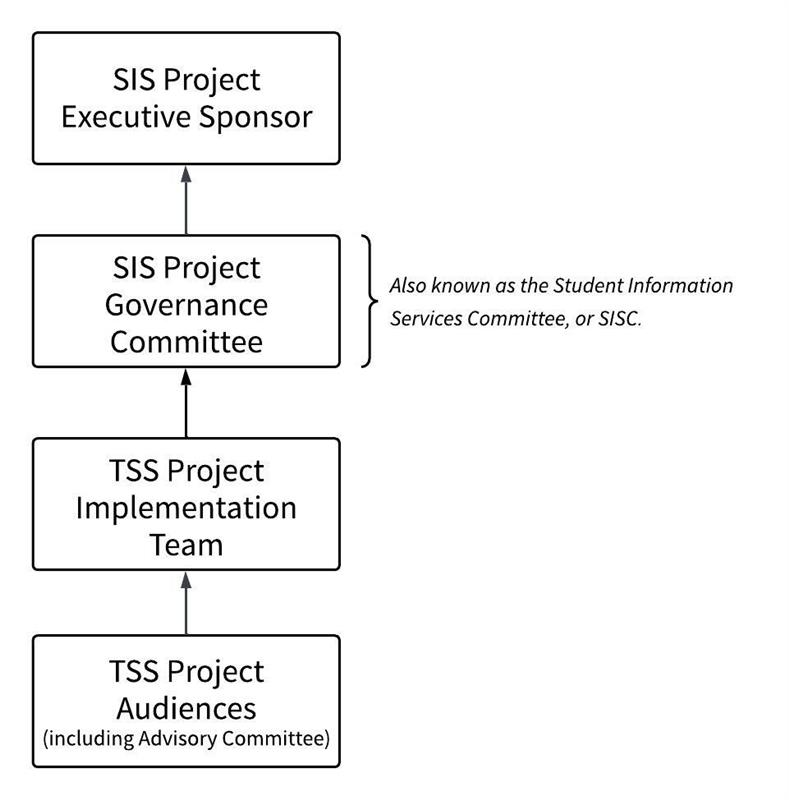
Governance
About the System
Early TSS Demonstrations
Between October 2025 and June 2026, we held 8 demonstrations to showcase particular features of the new Triton Student System (TSS). These demos were presented prior to the release of TSS in August 2026. They are still available here as a resource, but they may not exactly match the current state of the system.
Please review the latest TSS-entials newsletter, and our training resources for the latest information.
Demonstration Recordings & Slides
- Student Experience 1 Recording | Student Experience 1 Slides
- Student Experience 2 Recording | Student Experience 2 Slides
- Grading Recording | Grading Slides
- DES Scheduling Recording | DES Scheduling Slides
- Instructional Scheduling Assistant (ISA) Recording | ISA Slides
- Triton Enrollment Authorization (TEA) Recording | TEA Slides
- Instructional Scheduling Assistant (Part 2) Recording | ISA (Part 2) Slides
- Find-a-Student Recording | Find-a-Student Slides
FAQ: Initial Release
OVERVIEW
1. What functions and processes are currently available in TSS?
The initial release of TSS will prioritize the university’s critical functions and processes. Additional features will be introduced in follow-up releases as time and resources allow. For a system of this size and scope, a phased rollout is standard practice, with additional releases continuing to add more functionality.
2. Does TSS offer the same functionality as the previous student information system?
The short answer is no. Over many years, processes and workarounds were created to address limitations or missing functionality in the legacy system. As part of the transition to TSS, we seperated essential functionality from those legacy workarounds and redesigned some processes. As a result, certain tasks may be completed differently in TSS. We have developed future state processes in conversations with stakeholders using the knowledge of our subject matter experts and aligned with our guiding principles. This future state process design began with the Process Design Workshops and continue in an iterative fashion throughout the build phase of the project.
3. What is “MVP”?
You may hear this initial release sometimes referred to by the software development industry-standard term of “Minimum Viable Product” or “MVP”.
CRITICAL FUNCTIONS
4. What are critical functions?
Critical functions and processes are those which we must be able to execute to maintain the ongoing operations of the university, such as those required to deliver transcripts and diplomas to students. The initial release of the new TSS must be stabilized before any future releases can be made.
5. What are the features included in the initial release and why were they prioritized?
The project’s design team has already put a great deal of intentional thought into what will be in the initial release and has consulted with many functional subject matter experts from across the university, including Registrar, Division of Extended Studies (DES), Student Financial Solutions, Division of Graduate Education and Postdoctoral Affairs (GEPA), Financial Support Unit, Financial Aid and Scholarships, Business & Financial Services and others.
6. What is included in the list of critical functions?
While these resources do not provide a comprehensive list, you can learn more about some of the critical processes and functions from the Process Design Workshops and Process Design Documents. A list of what functions have been identified as critical and therefore prioritized for the initial release will be made available for the university community to review.
7. How is it decided which functions and processes will be prioritized for the initial release?
In addition to the design team and the functional subject matter experts (SMEs) already consulted, the project’s advisory committee and governance committee will also have opportunities to review and provide feedback on the list of critical functions prioritized for the initial release.
8. Who decides what is included in the initial release?
Final approval of the list, following review and feedback, lies with the Business Process Owner (Cindy Lyons), Service Owner (Jonathan Whitman), and Governance Chair (Christine Alvarado).
9. How will we be sure that all critical functions and processes are included in the initial release?
Even with the large amount of time and input that has already gone into determining what will be prioritized for the initial release, we are certain that we have not captured everything yet.
10. How do we know we've captured all the critical priorities for the initial release?
As we continue through the design and build phases of the project, we will continue to refine what will be included in the initial release and consult with stakeholders from across the university to review and provide input on what will be included.
PROVIDING FEEDBACK
11. Who can provide input into the priority list for the initial release?
We rely on our university community with their own specialized knowledge to help us identify critical functionality that we may not have identified yet, so it can be prioritized for the initial release. Both the advisory and governance committees for the project will be engaged for their review and feedback.
12. How can someone outside of the project teams and committees review and provide input for the priority list?
The priority list for the initial TSS releases has been finalized. However, members of the campus community can continue to share feedback through established feedback channels, such as the Share Your TSS Experience form. This input may help inform ongoing improvements and the prioritization of future enhancements.
PROJECT TIMELINE AND RESOURCES
13. How are the project timeline and resources connected to which functions are prioritized for the initial release?
The timeline and resourcing of the TSS Project are aligned with our understanding of needs for the delivery of the initial release with only critical functionality. Resourcing and timeline may adjust in the future as we know more about what will be required to deliver on the critical functionality.
14. Can the project timeline be adjusted to address non-critical functions?
No resourcing or timeline adjustments will be made for any non-critical functions selected for inclusion in the initial release, and non-critical functions selected for the initial release are subject to removal from the initial release, should resources need to be redirected to delivering critical functionality.
15. What is the difference between go live and cutover?
Cutover is the detailed process of switching from the old system to the new one, or the “how,” and go live is the specific moment the new system (or a specific function of the new system) is launched and users begin to use it, or the “when.” A successful go live is the desired outcome of a well-executed cutover. The cutover encompasses all the steps needed to reach a particular go-live milestone.
16. What do you mean by “go live is not a one-day event”?
For a project of this size and complexity, cutover will be a process that unfolds over several months and there will be multiple go-live dates upon which new system functions will go live for end users. Cutover activities are expected to begin as early as January 2026 and to continue through December 2026. Some examples of cutover activities are: data migration, system configuration, user training and final testing.
At each go-live point, readiness will be assessed by the project’s governance committee with recommendations from the project’s implementation team and advisory committee, and a formal decision will be made on whether or not to go live. Readiness (via a go/no-go assessment) will be determined using a detailed set of criteria designed to ensure that go live is successful and that there is as little disruption to the university operations as possible. Readiness criterion cover system functionality, data quality, training completion and operational preparedness, among many other areas of importance.
17. Who will decide if we are ready to go-live and how will they make that determination?
The implementation team will be taking many steps to support a smooth cutover process, including extensive testing, comprehensive training and detailed risk management planning. Key operational dates, like registration periods and financial and academic deadlines, have been factored into the timeline to minimize disruptions.
18. How will you ensure that go-live is smooth and minimize disruption to university operations?
Given the project’s immense complexity, even with the best and most comprehensive plans, issues will likely arise and be identified during the cutover process, as well as during the hypercare and stabilization periods immediately following cutover. The full attention and effort of the project implementation team will be on addressing these issues and supporting end users during this time.
19. Will students or faculty experience system outages or service interruptions during cutover?
As we migrate data from our old systems to TSS, we must ensure the integrity of that data. At certain points during cutover, we will need to stop changes from being made to data within our current systems; this stoppage of data changes is a “data freeze.” It is necessary to freeze data to ensure that no data is missed when migrating from old systems and processes to new systems and processes.
For more information about data freezes for TSS, please see: Overall Change Freeze Plan
MOVING TO THE NEW SYSTEM
20. What if something critical is missed and not included in the initial release? Once realized, how will this be handled by the team?
The project teams execute ongoing risk assessment and management and gather input from a wide-range of subject matter experts throughout the project to attempt to mitigate the risk of missing critical functionality for the initial release. However, given its immense complexity, even with continued review, feedback and refinement throughout the project, we may still miss something critical for the initial release. Identifying and closing these functionality gaps is a key aspect of the stabilization phase of the project, and the full attention and effort of both our business and technical implementation team members will be on closing any gaps during stabilization.
21. Does TSS offer the same functionality as the previous student information system?
The short answer is no. Over many years, processes and workarounds were created to address limitations or missing functionality in the legacy system. As part of the transition to TSS, we seperated essential functionality from those legacy workarounds and redesigned some processes. As a result, certain tasks may be completed differently in TSS. We have developed future state processes in conversations with stakeholders using the knowledge of our subject matter experts and aligned with our guiding principles. This future state process design began with the Process Design Workshops and continue in an iterative fashion throughout the build phase of the project.
22. How can we be sure the team truly understands what functionally may change and how that might impact my work?
We spent over a year inventorying and analyzing how current work is conducted with input from subject matter experts across the university. As we implement new systems, especially the new TSS, which will replace ISIS, we will rely on this baseline to help us understand and communicate changes. We will also continue to involve subject matter experts throughout the project and especially in advising our decisions.
STABILIZATION
23. What is stabilization?
Identifying and closing functionality gaps and addressing any bugs identified after go-live are key aspects of the stabilization phase of the project. The full attention and effort of both our business and technical implementation team members will be addressing gaps and bugs during stabilization.
24. What is the team focused on during the stabilization phase of the project?
The initial release of the new TSS will not be considered stabilized until we have closed all identified critical functionality gaps. Once the initial release has been stabilized, then the team will focus on the future releases.
25. Will the new TSS and ISIS run in parallel?
We will not turn off ISIS until we are certain that the new TSS is functioning as expected and we can maintain the ongoing operations of the university.
26. Will we be creating duplicate entries in ISIS and TSS post go-live of TSS?
While we plan to have ISIS and TSS running in parallel for some period of time, we do not expect that we will be creating transactions in both systems post-go-live of the new TSS. Should there be an urgent need to return to using ISIS after going live with TSS, we will have a clearly defined rollback plan to follow. Due to the disruption and manual work that would be required to return to using ISIS, the decision to rollback would only be made if absolutely necessary.
27. When will ISIS be shut off?
The decision to shut down ISIS entirely will follow a robust and structured process that will include key functional and technical stakeholders. Exactly when ISIS will be shut down and the framework that will be followed in doing so will be communicated to the wider university community via existing project communications channels as those details become available.
NON-CRITICAL FUNCTIONS
28. What features are excluded from the initial release?
Non-critical functions and processes will be deprioritized for the initial release and only included in the initial release if time and resources allow.
29. What is the plan for future inclusion of functions excluded from the initial release?
Following the stabilization of the initial release, there will be subsequent releases, which will include the functions not included in the initial release.
30. Will there be workarounds for functionality not included in the initial release?
The Design Team will provide thought partnership to units on addressing limitations and developing workarounds for those functions and processes not included in the initial release. The TSS Project advisory committee will also assist in addressing limitations and developing temporary workarounds.
31. Who will participate in the creation of workarounds?
It is not known at this time what workarounds may be needed for the initial release. As we know more, we will share that information with the university community via existing project communications channels.
FAQ: Integrations
CANVAS
1. After the integration runs between Canvas and TSS and value (1-5) is stored in TSS for given student/language exam (e.g. French), along with data coming into TSS from Courseleaf and/or being migrated – How does TSS support the process to control/enforce the pre-requisites (to determine whether a registration block should be lifted), similar to what ISIS does today?
TSS compares the course approval’s pre-req requirement to the student’s record and calculates whether the student has fulfilled the prereq. If the student has submitted a TEA request, TSS checks for that too, in the event of an approved prereq override.
TRITONGPT
2. Does TSS have any AI capabilities? Can AI apps be added to TSS in the future?
No, not at this time. However, we are partnering with TritonGPT to implement a student planner to supplement TSS. TSS is very extendable to AI apps in the future.
INSTRUCTIONAL SCHEDULING ASSISTANT (ISA)
3. When building a schedule, under planned section, there's a toggle that says "waitlist only", when this is turned on, does this act like our current process of setting the EL to 0? Meaning, students would not be able to enroll in the section, even via the waitlist process, when the toggle is turned on.
Yes this is correct. It disallows enrollment in the class and you have to approve students to get in.
4. What exactly does ONL, LON, and HYB mean and how does that interact with the R-course designation?
R class designations within a course number will still have meaning, connoting that a class is online. However, we are integrating a more robust course modality with TSS and so the online classes will be approved to be online, and there are multiple options.
5. Would the student see the day of the week or will they see the date?
They will see both.
6. How will instructor names be added to the new Schedule of Classes?
This will take place in the Instructional Scheduling Assistant (ISA).
FAQ: Booking
OVERVIEW
1. Why has the name changed from enrollment to booking?
The term “booking” comes directly from the underlying system (SAP Student Lifecycle Management), which uses standard terminology aligned with European higher education models. This terminology is built into the system.
As part of the TSS implementation approach, the university made a deliberate decision to use the system as designed (“out of the box”) wherever possible. Changing core terminology like this would require extensive customization, ongoing maintenance with every system update, and introduce additional cost and risk. For that reason, this was reviewed and agreed with the projects executive leadership and the EVC as the formal Business Sponsor of the project as part of the product selection and implementation approach.
2. For student booking who need a minimum of 12 units (ie. Student Athletes), what happens if they attempt to drop below 12 units?
Students who need to maintain full time enrollment will be prevented from dropping a course.This functionality includes minimum units for: Student Athletes, Student Receiving Financial Aid, Graduate Students, International Students, and all other students.
3. For graduate students, when will booking and waitlists open, and will there be an assigned time slot like undergraduate students?
The specific start time for booking will be published once students gain access to TSS on Monday, July 20th. Please note that for FA26, continuing and incoming graduate students will have the same booking window. Therefore, when booking opens on July 22, all graduate students will have access to begin enrolling in courses. Waitlists open August 17. The different start dates for new and incoming refers to undergraduate booking times only. The registration calendar indicates "New graduate students check with your program” for the date that booking begins for continuing students, since some graduate programs will require that their new/incoming students enroll following a program orientation at a later date, but all graduate students will have access to enroll starting on July 22.
4. For the booking windows criteria and quarters completed, is it only referring to full-time status (12 units minimum per quarter)? If a student was approved for part time status and completed it, how does that calculate in this situation?
The full time/part time status of a student is not a factor in booking window assignments. The booking window assignment are driven off of two factors only: total number of units completed and number of quarters completed (Note: Transfer students get a starting quarter count of 6 quarters).
5. Is the My Holds area the only way a student would be notified of a hold? How would they know to go there before they are attempting to make enrollment changes?
My Holds will give feedback via the tile on the main page, and then the students will see hold messages in enrollment. Students will also see any active holds when they check their appointment time in the My Appointment Times app.
WAITLISTS
6. Will departments be able to adjust waitlists?
No, departments will not be able to toggle waitlists on or off, but they will be able to turn a section into “waitlist only” and in reviewing Triton Enrollment Authorization (TEA) requests, review information about the student in a Waitlist Report available in TSS.
7. How will departments control enrollment in courses where students must be preauthorized? Do they set enrollment limit to 0?
Enrollment can no longer be set to 0 but there is a waitlist only toggle that will place students on a waitlist instead of directly booking/enrolling. This was also explained in the ISA Demonstration recording.
8. What is the timing and process for removing “waitlist only” from ISA? Are students immediately moved to the class or does this happen overnight? Will staff and faculty have the ability to manually move people over to book the course?
The specifics of this process are still being fine-tuned, but the idea is that you remove the “waitlist only” flag in ISA, and, as long as Registrar has the Waitlists functionality turned on in TSS, students would be immediately moved to courses in real time.
9. Is the TSS Waitlist Report the same data as the new BAH Waitlist tool (replacing Querylink)?
They are not the same and both will exist side-by-side. The TSS report does not have as many reporting options but will be real-time.
10. How does TSS handle waitlist eligibility compared to ISIS?
TSS handles waitlist eligibility the same way it handles booking eligibility. If a student meets the requirements to book a course, they can also waitlist the course.
DROPPING A COURSE
11. Does dropping a course still trigger a confirmation email to the student?
Yes, an email will be triggered. Students will also be able to view communications sent to them in the My Correspondence app.
12. When students drop a section, are they also dropped from the lecture and vice versa? Or must the student drop both the section and the lecture?
Although this was not visible in the demo, the student will be prompted to drop all related sections: the lecture, the discussion, the lab, etc.
PROGRAM AND MAJOR/MINOR CODE CHANGES
13. Why do program and major codes look different?
As UC San Diego prepares for the launch of the Triton Student System (TSS) in July 2026, some program, major and minor codes are changing from how they appeared in the previous student system (ISIS).These updates are part of the technical work required to support the new system and to ensure consistent program structures across integrated platforms such as CourseLeaf and TSS. Beginning in 2026, some faculty and staff may begin to see the new TSS codes appear in CourseLeaf and other planning tools before TSS itself launches. For example, codes now follow a structured format that identifies the program, award type and a unique number (for example: COGS-BA-001).
14. What does this mean for faculty and staff?
For most users, no action is required.These updates are primarily part of system preparation work and will not change how programs, majors or minors function academically. In many cases, existing records or forms that reference older ISIS codes will be automatically mapped to the new TSS codes.
15. Where can I find the mapping between old and new codes?
A crosswalk between ISIS program codes and TSS program codes is available for reference to help departments understand how codes correspond between systems.
16. Why are these changes happening now?
Some updates must appear in CourseLeaf earlier than the TSS launch in order to support testing, integration and data preparation ahead of July 2026.
17. Will this affect students?
Students will continue to see program and major names as expected. The code updates are primarily administrative and system-facing and are not expected to affect students’ academic plans. More information about the TSS timeline and upcoming milestones is available on the TSS Project website.
PREREQUISITES, COREQUISITES, & TRITON ENROLLMENT AUTHORIZATION (TEA)
18. Is there any guidance for incoming (transfer and first-year) undergraduate students to prepare them to book courses?
Yes, to prepare transfer and first-year undergraduate students, please refer to the Incoming (Transfer and First-Year) Undergraduate Students FA26 Booking Guide for step-by-step instructions on how to book courses for fall 2026 quarter.
19. For enrollment, are there features that allow us to pre-set certain functions/filters to requests? Using EASy as an example again: can we filter by course, major, timestamp, etc?
Yes, there are several ways to do this. In TEA (the new EASy), there will be filters you can narrow the student list by.
20. Since enrollment requirements are defaulted, will it check things off as students meet them? Schedule of Classes will NOT tell a student if they meet pre-requisites for a course. It only functions as a display for what the requirements are. The “ My Courses” app will indicate which requirements the student has met/not met, which happens in the moment the student is attempting to book a class.
21. How does Booking work for courses with corequisites like many language courses (ie. LISP 1A & LISP 1AX)?
A student will be advised of the corequisite at the time of booking. If they do not book both parts of the course, they will be dropped by the TSS extended booking check job, which is the replacement of PGPE.
22. Staff are used to putting pre-authorization codes on things to manage waitlists and section capacity. Will they still do this?
Triton Enrollment Authorization (TEA) will have a staff portal that lets staff create requests on behalf of students, including pre-approved requests.
23. Will we be able to turn off pre-authorizations (if this feature still exists in TSS) from other departments until a certain point in enrollment, and then turn it back on?
Yes, turning on/off pre-authorizations at any point in time will be possible at the department level. Departments will have access to do this.
24. How will TEA manage multiple requests and unit limits?
The TEA process uses a rules-driven workflow to manage multiple authorization requests and ensure unit limits are enforced consistently across all student bookings.
25. When a student's TEA request is approved, does that update on the enrollment pre-req checklist? Or is this enrollment requirements list just to show the list of pre-reqs in order to directly enroll?
The Enrollment Requirements list is only meant to display the prerequisites required for direct enrollment. Students will see the “Select” button in the My Courses app and be able to choose a section once all prerequisites are met (excluding requirements that permit conditional booking).
26. How does TSS support the process to control/enforce the pre-requisites (to determine whether a registration block should be lifted), similar to what ISIS does today?
TSS compares the course approval’s pre-requisite requirement to the student’s record and calculates whether the student has fulfilled the prerequisite. If the student has submitted a TEA request, TSS checks for that too, in the event of an approved pre-req override.
27. How will grad students enroll in courses when they've waived the prerequisites?
Once a student receives authorization to enroll, they will navigate to the Schedule of Classes to locate the section, then select Go to Course Booking to complete the booking.
FAQ: Schedule of Classes
STRUCTURE
1. For the Year and Term on the Schedule of Classes, will the Schedule of Classes indicate what the “current” term or “upcoming” term is?
No, nothing will indicate current or upcoming in Schedule of Classes. Students will have to interpret the Academic Year and Session.
2. Will non-DES students see DES courses?
This Schedule of Classes will not include Division of Extended Studies (DES) courses. DES students will go to the DES site to see those courses.
3. What about teaching modality for individual studies that usually don’t have any?
Individual Studies will display in the Schedule of Classes whenever no modality filter is selected. Additionally, if a course does not have a modality configured, it will automatically appear in the search results.
4. Will we be able to pull multiple course codes and departments in a single search (similar to the search by code tab in the current SoC)?
You can multi-select everything except academic year and term.
5. Will we be able to search for a course such as ANTH 42, or would we need to add the dash with leading zeros?
It will require the zero and dash. If a student searches for “ANTH-002” they will get all listings for ANTH-002. If they search for “ANTH 2” the system will do the best it can and likely bring up all classes in Anthropology.
6. For “Event Status” what are the different categories?
There will be three categories: Firmly Booked, Cancelled, and Waitlist Only.
7. Are students able to plan their courses before their booking windows?
Yes, they would be able to plan their courses in TritonGPT when the Schedule of Classes becomes available for the term they want to plan for.
8. Will students have a “schedule” view where they can see their classes stack on a standard week calendar?
Yes, in the “My Schedule” module.
9. What does “firmly booked” mean on event status?
Firmly Booked means a section is officially scheduled.
10. What’s the purpose of the credit slider?
It lets a student specify a minimum and maximum number of credit courses they would like to search for (ie. all classes between 1 and 3 credits).
11. How will instructor names be added to the new Schedule of Classes?
This will take place in the Instructional Scheduling Assistant (ISA).
FILTERS
12. Will the Schedule of Classes have a filter to search for remote courses?
Yes, one of the filters in the SoC will be for modality (in-person, hybrid, or online).
13. Will there be a search option/filter for programs within a department?
No there will not. TSS will not have awareness of curriculum for a program, that will only be stored in uAchieve.
14. If students don’t put something (ie. specific instructor) in a filter category, will it automatically assume any of these?
Yes, it will produce all results.
FAQ: Future Release
OVERVIEW
1. Will there be updates to the system after the initial release?
Following the stabilization of the initial release, there will be subsequent releases, which will include the functions not included in the initial release. Input from functional subject matter experts from across the university will inform which non-critical functions are prioritized for which future release and in what order.
2. Who will determine what will be included in future releases?
The project will continue to be supported by functional, technical and organizational change management (OCM) teams for the future releases.
EXPECTATIONS AND CADENCE
3. Will there really be future releases?
We know that, based on past experience, some of you may rightfully have doubts about when or perhaps even if future releases of the new Triton Student System will come to fruition. We know that in the past, especially with our homegrown systems, updates after an initial release have been inconsistent and sometimes even nonexistent.
4. How can we be sure that future releases will actually happen?
With the new system not being a custom-developed, homegrown system, we will be able to be much more agile and able to support releasing additional functionality much more quickly than if we had to develop it ourselves. Additionally, resourcing for future releases will be prioritized to ensure their execution.
5. How often will new functions be released?
The cadence of the future releases is still to be determined.
6. What will the cadence of the future releases be?
Once it has been determined, it will be documented in the service’s sustainment plan and shared with the university community.
FUTURE RELEASE INPUT
7. How will SME feedback influence future releases?
Input from functional subject matter experts from across the university will inform which non-critical functions are prioritized for which future release and in what order (known as the “roadmap” for the TSS).
8. Who will prioritize the features for future releases?
We expect that there will be an advisory committee or group supporting the prioritization of features for the TSS future releases. This may be the existing advisory committee or a different committee formed specifically for the post-project sustainment of the TSS; this decision has not yet been made. Exactly how SME and stakeholder feedback will be gathered and incorporated into future release planning, including what kind of approval processes will exist for the roadmap, will be determined prior to the closing of the project, documented in the service’s sustainment plan, and shared with the university community.
COMMUNICATIONS
9. How will we know when future releases will be happening and what will be included in them?
Communications channels that will be used post-project to share about future releases and their deployment have not been determined yet, but will be determined prior to the closing of the TSS Project, documented in the service’s sustainment plan, and shared with the university community.
PROJECT CLOSING
10. Will future updates/releases be part of the Triton Student System Project?
Following the hypercare and stabilization phases of a project, the project typically ends and new, smaller projects are created to manage future releases. We anticipate the TSS Project will follow this typical pattern; however, it has not yet been decided whether or not that will happen. Once those decisions have been made, they will be documented in the service’s sustainment plan and shared with the university community.
PROJECT TEAMS
11. What will happen to the current project teams post go-live of the TSS?
How the current teams and committees supporting the TSS Project will transition post-project is still to be determined, but will be determined prior to the closing of the project, documented in the service’s sustainment plan, and shared with the university community.
Student Impact and Q&A
Training/Resources
Student Impact
RESOURCES FOR STUDENTS
- Incoming Undergraduate Students FA26 Booking Guide: For incoming transfer and first-year undergraduate students only to prepare them for booking courses.
- TSS Student Info Slide: A ready-to-share slide to introduce students to TSS changes.
- Student Tools: Help & Resources: How-tos & help for online student tools.
- Impact on Student Applications: A running list of student applications that are staying, changing, or retiring.
- FAQ: Booking drawer: More information about Booking
- FAQ: Schedule of Classes: More information about the Schedule of Classes
- TSS Project Website - for important information, updates and project news
- Follow @ucsdtritonlife on Instagram
Additional resources for how staff can support students can be found below in the Staff Impact section
1. WHAT IS THE TRITON STUDENT SYSTEM?
The Triton Student System (TSS) is UC San Diego's new student information system. TSS will modernize how students access academic, financial and personal information. Currently, students use MyTritonLink as their main tool for activities like registering for classes and viewing financial aid, and we expect that MyTritonLink will be replaced with a new tool provided by TSS.
2. WHY ARE WE CHANGING TO THE TRITON STUDENT SYSTEM?
As UCSD continues to grow and the needs evolve and so must our systems. Our current student information system has become very inefficient and has many costly manual processes that inhibit our ability to meet the needs of our students, where many solutions are makeshift and cannot be sustained.
When implemented,TSS will be more flexible and intuitive, will provide a better user experience and more effective processes, and will support a more connected and cohesive student experience.
3. WHAT IS CHANGING?
Several student applications will also be affected by the implementation of TSS. For information on what will be changing and what will remain the same, please refer to the Impacted Students Application List.
IMPORTANT DATES
SEPTEMBER 2026
WHAT YOU'LL NOTICE
- Students will receive email notifications when actions need to be taken. These will come as campus notices, emails from business offices, etc. so please pay special attention and view all emails from UC San Diego.
- Students will log in to TSS using their existing UC San Diego SSO credentials.
- Students should see and take note of their Triton Student Number (TSN) in TSS.
- Students will continue booking (including waitlisting) actions in TSS for fall 2026 courses.
- Students will be able to view their Degree Audit in TSS.
- Note that Summer 2026 courses will not display in TSS until after summer coursework is migrated. Students should use My TritonLink to view historical coursework and run a Degree Audit there.
- Data migration is sequentially occurring in TSS, so you may see new data added (especially related to academic history) in TSS over the coming weeks.
WHAT YOU NEED TO DO
After your first log in to TSS, review and update the below information in TSS to ensure accuracy of your student information. Learn more in the Managing My Personal Details guide. :
- Mailing address
- Chosen/lived name
- Direct deposit information
- Emergency contact information
FALL 2026 BOOKING (ENROLLMENT)
Beginning with Fall Quarter 2026, students will book classes using TSS.
Students will be assigned a booking cohort based on:
- Quarters completed
- Units passed
This change creates a more transparent process by allowing students to better understand when their booking window will open.
4. WHY IS THIS CHANGING?
The previous enrollment system relied on thousands of individual appointment times.
TSS can support significantly larger volumes of students, allowing entire student groups to receive booking access at the same time. This creates a more consistent and equitable experience.
BOOKING COHORTS
Important: Transfer students are automatically assigned 6 quarter completions at the beginning of their academic career.
|
Cohort |
Quarters Completed |
Units Passed |
|
Priority |
N/A |
N/A |
|
Senior 3 |
≥ 11 |
≥ 135 |
|
Senior 2 |
10 |
≥ 135 |
|
Senior 1 |
9 |
≥ 135 |
|
Junior 3 |
8 |
90 - 134.9 |
|
Junior 2 |
7 |
90 - 134.9 |
|
Junior 1 |
6 |
90 - 134.9 |
|
Sophomore |
3 - 5 |
45 - 89.9 |
|
First-Year |
≤ 2 |
≤ 44.9 |
For more information about Booking, see the FAQ: Booking drawer.
For more information about the Schedule of Classes, see the FAQ: Schedule of Classes drawer.
FREQUENTLY ASKED QUESTIONS
5. I am an undergraduate or graduate student. Why do I see references to Division of Extended Studies (DES) on my Student Overview Homepage?
The Student Overview Homepage in TSS is the central hub for all students, main campus and Extended Studies (DES). As of August 11, DES functionality is live in TSS, so the DES section appearing on the Student Overview Homepage is expected and does not indicate an error or require a support ticket. Students only need to utilize this section if they are a DES student. View more information in the TSS Login and Navigation Student Guide.
6. When am I able to make Major/Minor changes?
Undergraduate Students: As part of the transition to TSS, access to update your major or minor will be temporarily unavailable until later in the Fall quarter. This is a temporary change related to the transition to TSS. We will share updates and additional instructions when the ability to update your major or minor is available again.
The Selective Major Application is separate from TSS and is open. The deadline to apply for a selective major (for continuing students only) is September 1. Visit Selective Major Guidance for additional information.
Graduate Students: Please visit the following GEPA website for more instructions on changing your major or degree aim: https://grad.ucsd.edu/academics/policies-procedures/index.html#change-of-department-major-or-degree…
7. How will booking/enrollment windows be assigned?
Students have been placed in cohorts determined by the number of quarters completed AND units passed. See Booking Cohorts above.
8. What will the new booking windows look like?
Although this has not yet been finalized, booking windows in July for Fall Quarter 2026 will likely open up booking to a cohort per day for the first pass and 2 cohorts per day on the second pass. First pass will likely be 4 days long per pass, and second pass will last into mid-August, before booking pauses to allow incoming students time to book. Booking will re-open for everyone in late-August and should continue as expected through Week 2 of Fall.
Winter Quarter 2026 and subsequent quarter booking windows will likely be more condensed and faster paced.
9. Why is there a change in the booking/enrollment windows?
The launch of the new Triton Student System (TSS) provides a new user experience for students, which also includes a change in processes. In the past, groups of approximately 100 students were assigned booking windows every 10 minutes because our enrollment system couldn’t handle the volume of students within a student level. TSS can handle the expected volume, so it allows thousands of students the same booking window, providing a much more level playing field and possibly earlier access to book courses.
Students will be placed in a “cohort” assigned by quarters completed and units passed. In the old system, a student’s appointment time assignment wasn’t always transparent, as there were so many appointment times and so few students in each. In TSS, students should always be able to calculate their own booking window, and know when their window will begin.
All students admitted after Fall 2019 are subject to UCSD's quarter limit policy, which limits them to 12 quarters to complete their graduation requirements. By including quarters completed in the calculation for booking windows, we are more closely aligning with that policy to allow students who are nearing that limit the best chance to graduate in a timely fashion.
10. Can I change my booking window?
No, the booking window assignment is automated based on calculations of your total units passed in combination with your total quarters completed. You must meet both requirements to move to the next booking window.
11. Do AP/IB credits count?
Yes, AP/IB credits count towards your units passed.
12. Do Summer Session classes count towards completed quarters?
No, Summer Sessions do not count towards quarters completed, courses completed during Summer Sessions do count towards units passed. This has been done intentionally to align with the quarter limit policy which excludes Summer Sessions in the quarter count.
13. I am near graduation but have completed less quarters than the assigned designation (e.g. I have passed 135+ units but only 7 quarters → Junior 2). I am worried that I won’t be able to book the necessary upper division courses to graduate as planned since those courses fill up very quickly with upperclass students.
If you have concerns about course planning to maintain a desired graduation date, reach out to your college and major advisors through the Virtual Advising Center (VAC).
Larger booking window groups should help increase the chances of booking the needed courses. In the old system, you may have had an appointment time hours behind someone who only had 1-2 more units than you. Now, all students with the same student class level by units and same number of quarters completed will have access to book classes at the same time.
Departments are aware of limitations on their courses, and when they have more demand than available seats, so they may have solutions to help you maintain your desired graduation date. Reach out to them through the VAC for guidance.
14. Do part-time terms count towards completed quarters?
Yes, part-time terms do count as completed terms. We understand that students may not always be able to remain enrolled full-time due to obligations outside the university, and we don’t want to disadvantage those students by disqualifying a part-time fall, winter or spring term. Note however, that students are limited in the number of units they can earn in part-time terms, and so may take longer to reach the next student class level than those attending full-time.
15. How do I plan my courses before I schedule them?
Since WebReg is being discontinued, the planner functionality within it is no longer available. Undergraduate students can use the Class Planner to help plan courses.
16. I am a Veteran. How do I submit an Enrollment Verification form?
For now, undergraduate students should follow these steps to use federal veterans benefits:
- Undergraduate students using federal VA (Veterans Affairs) benefits submit a request to the Virtual Advising Center (VAC) to request their academic advisors to verify that their courses meet degree requirements.
- Once you receive answers from your advisors in VAC, please fill out this Google Form to indicate that you would like for the Veterans Affairs Office (VAO) to report your enrollment to the VA.
- Once the Google Form is received, VAO would log into VAC and certify your enrollment to the VA based on the advisor responses.
You must repeat this process to make enrollment/unit changes to your schedule.
Graduate students still need to email their graduate advising units to confirm the information and forward those responses to the VAO so that the VAO may certify enrollment.
We appreciate your flexibility as we continue to work on the Triton Student System and adding features over time.
STUDENT IDENTIFICATION
17. Will the PID still be called PID or something else?
PID will change and be called Triton Student Number (TSN).
18. Will students receive new PIDs in TSS or does their current PID carry over?
Students who currently have PID numbers will be assigned new ID numbers called a TSN. These are 9 digits between 200000000 and 999999999. The legacy PID will be stored in an ID storage screen in the system. Staff will be able to search student records using both the PID and TSN, however; only the TSN will be visible to students. New incoming students will only have a TSN.
19. Will students who begin in Summer 2026 get a PID or TSN?
Students who enroll prior to Fall Quarter 2026 (e.g. Summer Sessions 2026) will have both a PID and a TSN. Continuing students will have both a PID and TSN. Only the TSN will be visible in TSS.
TSS HYPERCARE SUPPORT: WHERE TO GET HELP
As UC San Diego prepares for the Summer 2026 launch of TSS, a coordinated post-launch support model (aka hypercare) is being developed to help faculty, staff and students get timely assistance and guidance during the transition.
- Support portal: SNOW Ticket Submission
-
- Same hours as email support (see below)
-
- Phone support: (858) 246-4357
- Press 2 for Main Campus undergrad & grad TSS Support
- Press 3 for DES (Division of Extended Studies) TSS Support
- Same hours as email support (see below)
- Office Hours support: Zoom
- Weekdays (Monday through Friday) only
- September 21 to December 18: 9:00 a.m.–7:00 p.m.
- No weekend support
- Weekdays (Monday through Friday) only
- Email support: tss@ucsd.edu which will route requests into the support process
- Weekdays (Monday through Friday)
- September 21 to December 18: 7:00 a.m.–10:00 p.m.
- Weekends (Saturday and Sunday)
- September 19 to December 13: 12:00p.m.–3:00 p.m.
- Weekdays (Monday through Friday)
- TSS Access Requests: Review the TSS Roles & Access knowledge base article to learn if your role will need access to TSS and how to submit the access request form.
- Weekly newsletter, The TSS-entials
During hypercare, TSS-related issues should be submitted through the appropriate support channel so they can be tracked, triaged and routed to the right functional or technical support team. To support efficient resolution, please submit one request per issue and avoid opening multiple tickets for the same issue. If you have additional information to add, update the existing ticket rather than creating a new one. Additional details, including finalized support hours and expanded Office Hours, will be shared as launch approaches.
20. Can we get WebReg back (now or in the future)?
No, returning to WebReg is not possible. WebReg was a university-built web interface for our former student information system, ISIS. With the transition to TSS, we are no longer using ISIS, and therefore WebReg is no longer available. For more information on why we are no longer using ISIS, please see the Time to Upgrade: Why We Must Replace ISIS Now article. The new Class Planner, which is similar to WebReg’s visual class planning approach, was developed in direct response to feedback from students requesting a non-AI, visual tool for class planning and is available for all students to use. The development team continues to receive feedback for improvements to the Class Planner, and those are actively being reviewed and prioritized.
21. How frequently is the TSS team currently meeting to identify and address bugs/issues?
The TSS team meets multiple times every day, including weekends, to identify, prioritize, and address bugs. Across the team, we are working nearly 24-hours a day on bug fixes.
22. How are issues prioritized for fixes?
We prioritize highest severity issues and those affecting the largest number of students. The team’s highest priority goal right now is to ensure that all students can book their classes and receive their financial aid. Issues that are preventing students from booking or receiving financial aid are addressed first, in order of the number of students affected. Once we have addressed all critical issues, we will turn our attention to addressing issues that impact system usability.
23. Will I ever get to use my phone or Firefox web browser to access TSS?
The team will work on fixes for browser compatibility issues once we resolve all critical issues that are preventing students from accessing core system functionality (e.g., booking, financial aid). While we do not have a timeline yet, once the use of TSS through other web browsers is available, we will share it via our standard project communications channels, such as the TSS: Current Limitations & Known Issues document and the TSS Project website.
Student Identity
PID - TSN
1. Will the PID still be called PID or something else?
PID will change and be called Triton Student Number (TSN).
2. Will students receive new PIDs in TSS or does their current PID carry over?
Students who currently have PID numbers will be assigned new ID numbers in TSS called TSN. They will be 9 digits between 200000000 and 999999999. The legacy PID will be stored in an ID storage screen in the system.
3. Will students who begin in the summer get a PID or TSN?
Students will get a TSN when the admitted students are loaded to TSS (currently 3/1 for Grad and 3/16 for undergrad). Legacy PID would get assigned when they fill out the Summer Session Application.
4. Will faculty members have a new ID to replace their PID for scheduling purposes?
Yes, if you are referring to the PID that all entities have in ISIS. We will no longer use PIDs in TSS. Additionally, TSS will store student records and instructor records differently. Student records will be associated with an ST object, which allows them to be assigned curriculum and enroll; instructors will be associated with a P object, which is a type of entity in the system. TSS will use the PATH Employee ID as the primary identifier for instructors. If an instructor does not have a PATH EID then an internal TSS “P” Number will be assigned for those people (usually in DES).
5. PID vs. TSN - will be able to search PIDs in TSS for continuing students with both PID and TSN? In the backend, will you have PID and TSN in database?
Students will only be able to see their Triton Student Number (TSN) when interfacing with TSS. Staff will have the ability to search by either TSN or PID through Find-A-Student, however; My Personal Details in TSS will only have TSN and not the PID.
6. Will returning students’ old PID still be in the system and is there a report we can access that shows their old student number during summer?
Staff will be able to search student records by the old number.
CARDS
7. Will students be receiving new student ID cards?
No, continuing students will not be reissued a student ID card. If a student requires a replacement, the new card will have their new Triton Student Number (TSN).
IDENTIFIERS
8. What will happen with the PIDs or student identifiers of accepted but not enrolled students?
The TSN will remain assigned to the accepted but not enrolled students with additional data points identifying that specific grouping of students. Once a TSN is assigned to a student, it remains as their number permanently.
9. Will both old PID and new Triton Student Number (TSN) be available in Student Activity Hub (SAH), so others can develop reports using those? If so, when?
Yes, both will be available in SAH. The first SAH release including both TSS and ISIS information is currently scheduled for March 2026, coinciding with Fall 2026 incoming students loading into TSS. Note: that this timeframe could be somewhere between early and late March, depending on the completion of user acceptance testing.
Staff Impact and Q&A
Training/Resources
Impacts to Staff
RESOURCES
- TSS Training Blink Page: Role-based, practical training for staff & faculty will be provided here.
- TSS Glossary: Definitions for new TSS terms and tools.
- TSS Demonstrations Playlist: A playlist of all the demonstrations of TSS features in action. The demos that may be applicable to your role are:
- Instructional Scheduling Assistant (ISA): Scheduling process
- Instructional Scheduling Assistant (ISA) Part 2: The design, schedule differences, & change requests
- Triton Enrollment Authorization (TEA): TEA requests, lifecycle, & admin
- Note: TEA is a replacement for the EASy tool.
- Find-a-Student: Searching & viewing student information
- Impact on Applications You Use: A running list of staff applications that are staying, changing, or retiring.
- TSS Project Major Milestones: Timeline for when each change takes effect, including staff access.
- TSS Impacts on Student Reporting: Learn how TSS changes your reports, including the new SIS Data Source option and field updates.
- Undergraduate Major Codes Table ISIS v. TSS: A side-by-side comparison of ISIS major and minor codes and their TSS equivalents.
- Business Analytics Hub: Your new hub for all things reporting. View the categories on the navigation bar to find a report that fits your needs.
HOW TO SUPPORT STUDENTS & STUDENT-FACING STAFF RESOURCES
Here is a list of Student Support and resources to receive updates and support:
- FA26 TSS Student Info Slide: A ready-to-share slide to introduce your students to TSS changes and provide updates for FA26.
- Student Tools: Help & Resources: Point your students to this resource for all TSS how-tos & general help for online student tools.
- How to Support Students & Their Interaction with TSS: Guidance for helping students navigating the transition.
- TritonLink TSS Training Hub - updates in progress and will transition to TSS aides once students gain access
- TSS Project Website - for general information, updates and project news
- Submit a Service ticket: Technical support
- tss@ucsd.edu- email any questions
- TSS Staff Training Website: Role-based, practical training for you will be provided here.
- TSS Project Major Milestones: Timeline for when each change takes effect, including staff access.
- TSS Demonstrations Playlist: There are 8 demonstrations of TSS features in action. A few demos that may be applicable to your role are:
- Instructional Scheduling Assistant (ISA): Scheduling process
- Instructional Scheduling Assistant (ISA) Part 2: The look, schedule differences, & change requests
- Triton Enrollment Authorization (TEA): TEA requests, lifecycle, & admin
- Find-a-Student: Searching & viewing student information
- Impact on Student Applications: A running list of student applications that are staying, changing, or retiring.
- TSS Impacts on Student Reporting: Deep dive here about how TSS changes your reports, including the new SIS Data Source option and field updates.
- Undergraduate Major Codes Table ISIS v. TSS: A side-by-side comparison of ISIS major and minor codes and their TSS equivalents.
- Business Analytics Hub: Your new hub for reporting.
- TSS Glossary: Definitions for new TSS terms and tools.
- TEA FAQ for Advisors: a live resource of questions and answers about TEA.
Q&A
1. When and how do staff get access to TSS?
Staff and faculty who need TSS access are encouraged to submit the TSS Campus Access Request Form to support timely review and approval.
Access requests from teams directly involved in TSS development, testing and launch preparation will continue to be prioritized. All other staff and faculty access requests may be reviewed and held for final approval until TSS becomes available in mid-July.
Please consult the Knowledge Base Article (KBA) to identify which TSS role best aligns with their job responsibilities: TSS Role Request KBA.
2. When do students get access and what will the process be?
Students gain access to TSS in mid-July 2026, when the Fall 2026 schedule of classes is released and booking opens. They will log in to the new TSS Student Home page with their existing UC San Diego Active Directory (AD) account. Until students receive official notification via email regarding their TSS access they should keep using current systems. Continuing students book Fall 2026 classes in mid-July (instead of May), and incoming and transfer students register in August (as usual). All students will receive an email about their booking window.
3. What is “Booking” and how is student enrollment changing with TSS?
Enrollment is now called Booking in TSS. The most immediate change is that continuing students will book Fall 2026 courses in TSS in July instead of May. This change to Booking is a one time change due to the TSS transition. Subsequent quarters’ booking will take place on the regular timeline.
4. EASy is going away. How do I authorize students into classes now?
EASy is being replaced by Triton Enrollment Authorization (TEA). TEA includes a staff portal where staff members can create authorization requests on behalf of students, including pre-approved requests. If you currently use pre-authorization codes to manage waitlists or section capacity, that capability continues; departments can turn pre-authorizations on and off at the department level at any point during the booking cycle. TEA uses a rules-driven workflow to handle multiple requests and enforce unit limits consistently. You can watch the TEA Demonstration here. View the living resource, TEA FAQ for Advisors, created for academic advising staff's common questions and answers about TEA.
5. How do I look up a student in TSS?
Find-a-Student in TSS is an adaptation of the existing Find-a-Student application in TritonLink. You can watch the Find-a-Student Demonstration here.
6. What is happening to ISIS? Can I still get historical data after it's gone?
ISIS will remain functional through Summer 2026, but is expected to move to read-only in October 2026. Once Summer 2026 data is fully migrated into and validated in TSS, ISIS will be fully decommissioned (anticipated for December 2026). Once decommissioned, ISIS will only be accessible to ITS, so retrieving data directly from it will be difficult. Historical ISIS data, dated back to 2004, will be accessible through the Student Activity Hub (SAH).
7. QueryLink reports are being retired. How do I find a report I need now?
TSS uses a completely new data structure that the old QueryLink tool cannot read it, so QueryLink reports are either being retired, retained for historical access, or remediated to be uploaded to the Business Analytics Hub (BAH). Visit the Report Development Blink page to check the status of a specific report.
Essential reporting is being migrated in advance of the new system and will pull data from the Activity Hubs, one being the Student Activity Hub (SAH). Reports will be available via the Business Analytics Hub, where you will find a centralized list of analytics and reports that will use data from one or more of the Activity Hubs. Take the training here: UC San Diego Business Analytics Hub Fundamentals.
8. The PID is being retired. What does that mean for the reports that I work with?
New students incoming Fall Quarter 2026 will only receive a Triton Student Number (TSN). Continuing students will keep their PID and receive a TSN. Searching or filtering with either PID or TSN will find all data related to the student regardless of which system the data comes from. If you run reports via the Business Analytics Hub, your generated data will include a SIS Data Source column.
9. Course, section, and program codes are also changing. What does that mean for me?
Course numbers, section codes, and major/minor/program codes are all moving to new TSS formats you'll see across your tools and reports. For most records, no action is needed since old ISIS codes are largely mapped automatically. See these training resources for guidance: ISA Training Resource for guidance on Understanding Course Number & Enrollment Changes (ISIS → TSS) and see our Major and Minor Code Lists.
10. What do I do if I find something in TSS not working properly?
As UC San Diego prepares for the Summer 2026 launch of TSS, a coordinated post-launch support model (aka hypercare) is being developed to help faculty, staff and students get timely assistance and guidance during the transition.
New hypercare support channels are available now and will include:
- Support portal: SNOW Ticket Submission
- Same hours as email support (see below)
- Phone support: (858) 246-4357
- Press 2 for Main Campus undergrad & grad TSS Support
- Press 3 for DES (Division of Extended Studies) TSS Support
- Same hours as email support (see below)
- Email support: tss@ucsd.edu which will route requests into the support process
- Weekdays (Monday through Friday)
- September 21 to December 18: 7:00 a.m.–10:00 p.m.
- Weekends (Saturday and Sunday)
- September 19 to December 13: 12:00p.m.–3:00 p.m.
- Weekdays (Monday through Friday)
- Office Hours support: Zoom
- Weekdays (Monday through Friday) only
- September 21 to December 18: 9:00 a.m.–7:00 p.m.
- No weekend support
- Weekdays (Monday through Friday) only
- TSS Access Requests: Review the TSS Roles & Access knowledge base article to learn if your role will need access to TSS and how to submit the access request form.
- Weekly newsletter, The TSS-entials
During hypercare, TSS-related issues should be submitted through the appropriate support channel so they can be tracked, triaged and routed to the right functional or technical support team. To support efficient resolution, please submit one request per issue and avoid opening multiple tickets for the same issue. If you have additional information to add, update the existing ticket rather than creating a new one. Additional details, including finalized support hours and expanded Office Hours, will be shared as launch approaches.
11. How can I prepare myself and/or my team for this transition?
- Start by reviewing and sharing the resources above. They explain why the change is happening and the actionable steps for your role.
- Bookmark & visit the TSS Website for all things TSS.
- Sign up for the ESR SIS Newsletter for monthly project updates.
- Email us at tss@ucsd.edu for general project questions.
- Visit us during drop in Office Hours offered 3x a week: Mondays (3-4pm), Wednesdays (9-10am), & Thursdays (10-11am).
12. How can I help support my colleagues through this transition?
When everyone is working in a new system at once, familiar tasks take longer and questions multiply. This is completely normal as change takes time. So be patient with yourself, with each other, and the new system, as we all adjust. You can help by sharing what you know and leaning on each other through this transition.
As TSS is introduced across the university, the project team will be available from mid-July through December 2026 to provide extra support for the campus community. Whether it be answering your questions, resolving issues, or developing resources, the team will be there to assist you throughout the transition. We're all in this together!
Faculty Impact and Q&A
Training/Resources
TSS FAQ for Faculty Doc
TSS FAQ for Faculty
Need a closer look? View the full presentation: TSS Faculty FAQ. Descriptive text has been added in the speaker notes of each slide for screen readers.
Faculty Impact
USEFUL LINKS
- TSS Faculty/Staff Training Website: Role-based, practical training for faculty/staff
- TSS Glossary: Definitions for new TSS terms and tools
- TSS Student Training Website: Practical training for students
- FA26 TSS Student Info Slide: Ready-to-share slide to introduce your students to TSS changes and FA26 updates
- Impacts to Faculty/Staff Applications Resource: Running list of faculty/staff applications that are staying, changing, or retiring.
- Impacts to Student Apps Resource: Running list of student applications that are staying, changing or retiring
- Major Milestones: Timeline for when each change takes effect
- TSS Demonstrations: Recordings of demonstrations that have been delivered (Grading demonstration, Instructional Scheduling Assistant & Student Experience demonstrations highly recommended for faculty)
- Understanding Course Number & Enrollment Changes (ISIS → TSS): Resource that delineates changes to course numbers, section IDs, and course & schedule terms.
- Read our Monthly Newsletter: Monthly updates about the ESR SIS Project, including TSS
- Read the Academic Affairs Newsletter: Important updates about the TSS Project will be shared in the Academic Affairs Newsletter
Q&A
1. When does TSS launch?
TSS officially goes live in mid-July. However, the rollout of TSS involves many different applications and systems, some of which will launch sooner than others. Some systems, especially those related to booking (enrollment), have already been made available to staff. For more information about the initial release, please see the FAQ: Initial Release drawer above.
2. What is changing due to TSS?
Many systems and applications are being retired or replaced by TSS. We encourage you to take a look at the Impacts to Applications resource, which describes changes to applications that faculty and staff use, and the Impacts to Students Applications resource, which describes changes to applications that students use.
Key changes of note for faculty include (more details on these topics below):
- Enrollment: Enrollment is now called Booking. For 2026 only, continuing students book Fall 2026 courses in July, instead of May. EASy will be replaced by the Triton Enrollment Authorization (TEA).
- Grading: eGrades is retiring as of Fall 2026. Faculty will enter or upload grades into TSS.
- Student ID: New FA26 students will receive only a Triton Student Number (TSN). Continuing students will have their old PID and a new TSN.
- Major codes: Current major codes will shift to a new TSS major code.
- Course codes: Current course codes will be changed to include leading zeroes.
- Class Lists: The Class Lists Blink instructor tool will be replaced by an equivalent TSS tool called My Class Lists.
- Find-a-Student: Student Name Lookup in Blink tool will be replaced by Find-a-Student in TSS.
3. What is not changing for faculty due to TSS?
- Summer Sessions 2026 enrollment will take place in WebReg. EASy requests will be used for Summer Session courses.
- Reporting Academic Integrity cases will remain the same
- Authorization for Accommodation (AFA) Letters will still be emailed to faculty. My OSD portal will be integrated with TSS, but the experience remains the same.
- Public-facing Blink pages will remain and links within will direct to different tools.
- Canvas will remain and will sync with TSS, instead of the legacy system.
- Classroom Details will remain in its current form.
- SET Course & Professor Evaluations results reviewer will not change. The evaluation page will be linked on the TSS Home page.
4. How do I best support student-facing colleagues?
Many student-facing staff, including those in advising and in the Registrar’s office, are working on the system, in addition to fulfilling their daily activities. You can expect there to be delays from many student-facing staff, and we ask for your patience and understanding as they continue the work to complete TSS. When you have trouble or find errors with TSS, please use the proper hypercare channels (described below), and refrain from reaching out to core staff directly.
5. How do I gain access to TSS?
Please see the June 2026 notice entitled “Action Recommended by July 1: Request Access to the Triton Student System (TSS)” for more information.
6. What do I do if I find something in TSS not working properly?
As UC San Diego prepares for the Summer 2026 launch of TSS, a coordinated post-launch support model (aka hypercare) is being developed to help faculty, staff and students get timely assistance and guidance during the transition.
Hypercare support channels are available and will include:
- Support portal: SNOW Ticket Submission
-
- Same hours as email support (see below)
-
- Office Hours support: Zoom
- Weekdays (Monday through Friday) only
- September 21 to December 18: 9:00 a.m.–7:00 p.m.
- No weekend support
- Weekdays (Monday through Friday) only
- Phone support: (858) 246-4357
- Press 2 for Main Campus undergrad & grad TSS Support
- Press 3 for DES (Division of Extended Studies) TSS Support
- Same hours as email support (see below)
- Email support: tss@ucsd.edu which will route requests into the support process
- Weekdays (Monday through Friday)
- September 21 to December 18: 7:00 a.m.–10:00 p.m.
- Weekends (Saturday and Sunday)
- September 19 to December 13: 12:00p.m.–3:00 p.m.
- Weekdays (Monday through Friday)
- TSS Access Requests: Review the TSS Roles & Access knowledge base article to learn if your role will need access to TSS and how to submit the access request form.
- Weekly newsletter, The TSS-entials
During hypercare, TSS-related issues should be submitted through the appropriate support channel so they can be tracked, triaged and routed to the right functional or technical support team. To support efficient resolution, please submit one request per issue and avoid opening multiple tickets for the same issue. If you have additional information to add, update the existing ticket rather than creating a new one. Additional details, including finalized support hours and expanded Office Hours, will be shared as launch approaches.
7. What is “Booking”? Why don’t we use “Enrollment” anymore? When will students book courses for Fall 2026?
“Booking” is the new term to replace “Enrollment.” Students will book courses starting in July, instead of May as they usually do. This is a temporary change that only applies to the Fall 2026 quarter.
We understand that the shift from “enrollment” to “booking” feels like a change in familiar language.
The term “booking” is built directly in the underlying system (SAP Student Lifecycle Management), which uses standard terminology aligned with European higher education models. Changing core terminology like this would require extensive customization, ongoing maintenance with every system update, and introduce additional cost and risk. For that reason, this was reviewed and agreed with the project’s executive leadership and the EVC as the formal Business Sponsor of the project as part of the product selection and implementation approach.
8. We received requests from EASy for enrollment. How will we do this in TSS?
The Enrollment Authorization System (EASy) will be replaced by the Triton Enrollment Authorization (TEA) system for enrollment pre-authorization requests starting with Fall 2026 enrollment. Please be prepared to approve TEA requests in July, with enrollment opening in mid-July. Please contact your department’s advising/student affairs leadership if you will not be available in mid-July to plan accordingly. For more information about TEA, please review the TEA demonstration. TSS training will also be made available.
9. How do I find students in the new system?
Class lists in Blink (https://act.ucsd.edu/FacultyClasslist) will retire. An app in TSS called My Class Lists will be found directly in TSS. This system will replicate the class photo list that exists in current state. Student QueryLInk reports have also been replaced with reports now available in the Business Analytics Hub. Please visit the Student Operational Reporting Page and take the training to request access. TSS training will also be made available. Please do not rely on departmental staff to run these reports for you.
Student Name Lookup will be replaced by Find-a-Student in TSS. Searching for a student and viewing their academic data will be available directly in TSS. Student records from the past 10 years are being migrated. Those older than 10 years will not be integrated into TSS. This may impact letters of recommendation. Please review the Find-a-Student demo as well as TSS training which will also be made available.
10. How do I get a course approved?
TSS is not directly involved in course approvals. Please see the CourseLeaf Courses & Materials Blink page for more information.
11. What are the changes in course number, section codes, and major codes? How will it affect me?
- Courses will use a new format, with a hyphen between the subject code and course number and leading zeroes to pad out lower division classes to three numeric digits. E.g. Math 18A would become MATH-018A.
- Please see the Understanding Course Number & Enrollment Changes (ISIS → TSS) resource for more details.
- Section codes will change in TSS as well. Some terminology and formatting will be different than what you are used to.
- Please see the Understanding Course Number & Enrollment Changes (ISIS → TSS) resource for more details.
- Current Major codes will shift to a new TSS Major code.
12. Will students’ transcripts show a mix of old and new course numbers, or only the course numbers in the new format?
If the transcript is generated by TSS, it will only show the new course number format. For student records 10+ years old, we are generating PDF versions of the ISIS transcripts and those include the old course numbers.
13. I heard that the PID will be retired. What does that mean for faculty and their students?
New students (i.e. admitted in Fall Quarter 2026) will receive only a Triton Student Number (TSN) that they will use in TSS. TSN is a 9-digit number starting with 2 (Ex. 200010746). Continuing students will have both a PID and a TSN, but only the TSN will be used by students in TSS. Faculty will be able to search for students by PID or TSN in TSS. Instructor’s employee ID (EID) will be used in place of a new TSN in TSS.
ID cards will not be reprinted for students, and new ID cards will not show a student’s TSN. Students should write down their TSN and carry it with them until they have it memorized.
If you use a lived/self-chosen name and would like it to appear in student-facing systems after TSS launches, please ensure your name is recorded in UCPath by July 1, 2026. Changes made in ISIS will not be recorded in TSS.
14. How do I submit grades for students?
eGrades is retiring and instructors will now enter or upload grades directly into TSS. Canvas will provide a download option in a format suitable for uploading to TSS. The Late Grades report will be retired. Late grades will be found in “Missing Results” in TSS. For more information about grading, please review the Grading demonstration. TSS training will also be made available.
15. How will incomplete grades from Spring and Summer be handled? Will they be automatically moved over to TSS?
We are planning a temporary solution in TSS for faculty/instructors to submit incomplete grades that were migrated. This interface will be different from where they enter Grades for Fall 2026 onwards. eGrades will not run in tandem with the new grading component of TSS.
16. How will students be informed about the changes coming from TSS? Is there anything I should share with my students to support them with TSS?
We have a comprehensive communications plan to reach out to students about changes to applications that they use, including messages and updates sent via email and social media. Please include the FA26 Information on TSS slide for students in your materials and highlight the student training that will be available. This slide summarizes vital TSS information for students.
17. Will account provisioning change under TSS?
Account provisioning will change and should be improved. Instructors who have a future-dated appointment for a term will be able to be added to that term even if the future-date of the appointment has not yet occurred.
18. How can I prepare myself and/or my team for this transition?
- Start with the resources above.
- The TSS Website serves as your source of truth for all things TSS.
- Sign up for the ESR SIS Newsletter for monthly project updates.
- For general project questions, you can email us at tss@ucsd.edu
FAQ: Grading
POLICIES
1. If a student changes their grading option before the quarterly deadline, how quickly does that appear on the instructor’s side?
Instructor sees the finalized grading options after they have saved the grade.
2. Will instructors be able to now change an final grade A-F to Incomplete? (Or is EPC petition still required to change?)
The limitation that an instructor cannot change a final grade to an incomplete is practice determined by the Academic Senate. As this isn't a system issue, there's no plan to change this practice in TSS. Anyone interested in seeing this practice changed will need to work with their faculty and through the shared governance process. TSS can support such a change if approved.
3. Are there keyboard shortcuts to type in the grade or do you have to use the mouse+pull down menu?
On the grade field you can select the field and enter the grade with your keyboard.
4. Is there a way for the system to auto save. I can imagine that some will forget to hit the 'save' button?
There is not an auto-save but will be prompted that you have unsaved changes.
5. If the enter grades page is closed before hitting save, is there a warning?
Yes, there will be a warning.
6. Once a record is locked, is there a way for the instructor to unlock the course, or see what the letter grade they originally entered was? or not until academic integrity has unlocked the course?
Current functionality is that once it's locked, there is no way to unlock the record or view the grade that was originally entered. Academic Integrity and Registrar must unlock the record.
7. Will instructors be able to now change an final grade A-F to Incomplete? (Or is EPC petition still required to change?)
The limitation that an instructor cannot change a final grade to an incomplete is practice determined by the Academic Senate. As this isn't a system issue, there's no plan to change this practice in TSS. Anyone interested in seeing this practice changed will need to work with their faculty and through the shared governance process. TSS can support such a change if approved.
INSTRUCTOR ROLES
8. Will “Department Chairperson” include vice-chairs?
This will be up to the department if they would like to configure it this way.
9. Is there a max on how many people can be designated Department Chairperson?
The system does have the flexibility and policy allows multiple people. It’s common for Department Chairs to delegate responsibilities.
10. Who will be able to access and see grades?
The specific grade tile would be one that pops up for a course instructor, department chair or an authorized grader. It would not appear to most non-instructor users because they would not have any classes for which they are graders. We also have a Missing/Late Grades report that staff can use to monitor grade submissions in their department.
Division of Extended Studies (DES) Impact and Q&A
Training/Resources
DES Staff: See DES internal resources for Training
DES Students: Introducing the Triton Student System
FAQ: DES Impact
USEFUL LINKS
- DES TSS portal page
- How to Support Students (DES)
- Introducing the Triton Student System (DES student support page)
- DES Hub TSS Resources (DES Staff/Instructors only)
- TSS Staff Training Blink (DES Staff/Instructors only)
- Demonstration Recordings
- Student DES FAQs
- Student Tools: Help & Resources (General TSS training, which also includes training and resources relevant to general campus students who are pursuing an undergraduate or graduate degree)
- Training:
Q&A
DES Instructors & Staff
1. What is the Triton Student System? When will it impact me?
UC San Diego is upgrading to a new student system called the Triton Student System (TSS). Starting with Fall 2026 enrollment, Extended Studies students will use TSS to manage their student account and access their records.
2. What new terminology should I expect to see in TSS?
- Booking = Enrolling in a course
- Event = A specific section of a course
- Triton Student Number (TSN) = New student ID number that replaces PID
- Interest list = A waitlist
- Event ID = Section number for a specific course offering
- Extended Booking Check = Notice that appears when a student does not meet the prerequisites for a course
3. How do I stay informed about the changes coming from TSS?
To stay informed, we encourage you to:
- Watch the recording of the TSS Demonstration of DES Scheduling
- Subscribe to the ESR SIS Newsletter for timely updates
- Bookmark the Introducing the Triton Student System website, which includes important information from Extended Studies about TSS
- Bookmark the DES TSS portal page
- Bookmark the TSS Project website for timelines and resources
- Bookmark the TSS Project Training website where staff/faculty training will be made available as its developed
- Attend weekly office hours (Weekdays: 9:00 a.m.–7:00 p.m.)
- Contact tss@ucsd.edu with any questions
6. I am a DES staff or instructor and have a question that is not listed here. Where do I go for more information?
Please visit the DES Hub TSS Resources page for more information.
DES Students
7. Where can I find the latest information from Extended Studies about TSS?
You can find important TSS information particular to DES at the Introducing the Triton Student System website. You can find the login page for DES at the DES Triton Student System portal page.
8. What is the Triton Student System? When will it impact me?
UC San Diego is upgrading to a new student system called the Triton Student System (TSS). Starting with Fall 2026 enrollment, Extended Studies students will use TSS to manage their student account and access their records.
9. I only take courses through DES. Why do I see mentions of main campus in my Student Overview Homepage?
The Student Overview Homepage in TSS is the central hub for all students, main campus and Extended Studies (DES). You will see various sections on the homepage related to TSS Apps, Main Campus, and Extended Studies. Visibility for all these sections, even though they may not be all applicable to you, is expected and does not indicate an error or require a support ticket. Students only need to utilize the sections that match the actions they are trying to complete.
10. Can I still access MyExtension?
MyExtension will remain available for reference for several months, but TSS will be where you manage your student account starting in August. If you are enrolled in a course that runs past September 21, 2026, you may still need to access MyExtension during the transition. If this applies, your instructor will be in touch with specific guidance.
Student records less than 10 years old will automatically carry over to TSS. Records older than 10 years will need to be imported to the new system, which will take a few days.
11. What is Booking? Why is there a change in terminology from Enrollment to Booking?
“Booking” is the new term to replace “Enrollment.”
We understand that the shift from “enrollment” to “booking” feels like a change in familiar language.
The term “booking” is built directly in the underlying system (SAP Student Lifecycle Management), which uses standard terminology aligned with European higher education models. Changing core terminology like this would require extensive customization, ongoing maintenance with every system update, and introduce additional cost and risk. For that reason, this was reviewed and agreed with the project’s executive leadership and the EVC as the formal Business Sponsor of the project as part of the product selection and implementation approach.